
🪄 AI Summary
Heading 1
Heading 2
Heading 3
Heading 4
Heading 5
Heading 6
Lorem ipsum dolor sit amet, consectetur adipiscing elit, sed do eiusmod tempor incididunt ut labore et dolore magna aliqua. Ut enim ad minim veniam, quis nostrud exercitation ullamco laboris nisi ut aliquip ex ea commodo consequat. Duis aute irure dolor in reprehenderit in voluptate velit esse cillum dolore eu fugiat nulla pariatur.
Block quote
Ordered list
- Item 1
- Item 2
- Item 3
Unordered list
- Item A
- Item B
- Item C
Bold text
Emphasis
Superscript
Subscript
A vague brief is a delayed project. Every time a SaaS founder or marketing lead sends over raw footage with a one-line instruction, the editor is forced to guess, and guessing costs rounds. These are the exact Video Editing Brief Mistakes That Slow You Down in 2026 I see consistently across B2B teams, and every single one is preventable before the editor opens the timeline.
TL;DR
- A weak brief is the root cause of most revision spirals and missed content calendar dates.
- Missing output specs, vague goals, and no brand references multiply your revision cycles.
- Fixing your brief upstream cuts turnaround time before the editor touches the footage.
- Most of these mistakes take under 10 minutes to eliminate with the right template.
Why Your Video Editing Project Keeps Getting Delayed
The delay is almost never the editor. Turnaround is a property of the process around the edit, not just the edit itself. The same video can come back in two days or two weeks depending on how footage arrives, how feedback is collected, and how many people approve the cut.
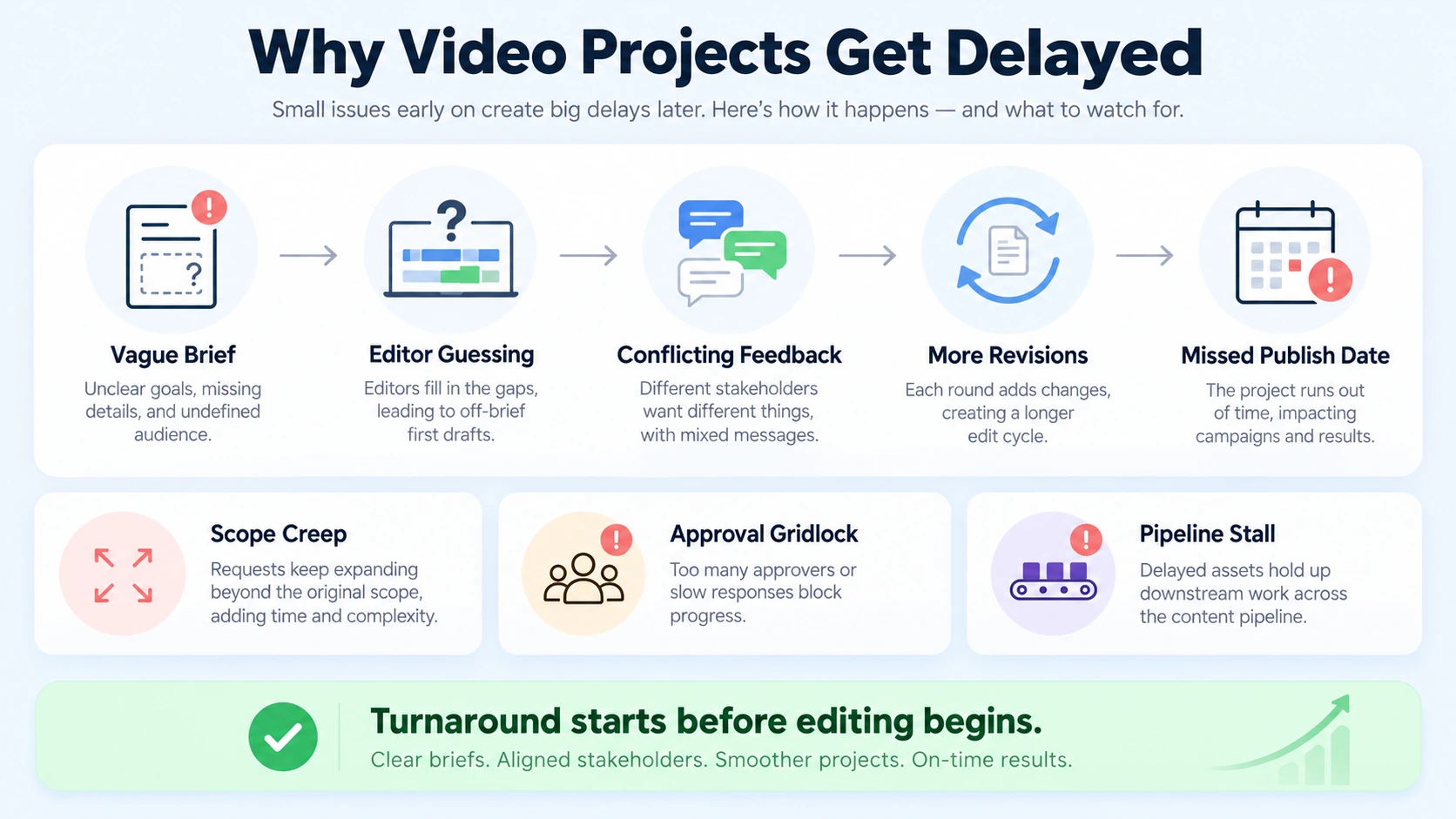
The number of revision rounds is the single biggest driver of final turnaround. Projects with clear briefs and minimal revisions maintain their original estimated timeline, while 2–3 revision rounds typically add 1–3 days, and extensive revisions of 4 or more rounds can double or triple the original timeline. Most B2B teams I work with at Komet Media—whether we are producing videos from scratch or repurposing existing media—treat the brief as an afterthought, a few Slack messages, maybe a Google Doc link. That approach creates three predictable problems:
- Scope creep: The editor interprets missing details liberally, building something that has to be rebuilt.
- Approval gridlock: Stakeholders with no shared reference point debate subjectively at review instead of comparing against a standard.
- Pipeline stall: Actual filming typically accounts for only 10–15% of the total project timeline. Pre-production, editing, revisions, and delivery consume the rest. A weak brief corrupts the largest share of your timeline.
The fix starts before the editor receives a single file. Define the goal, the format, the audience, the output specs, and the approval owner, all in one document. That document is your brief.
Mistake 1: No Clear Output Format or Platform Specification
This is the most common of the video editing brief mistakes that slow you down in 2026, and it wastes time on both sides. Sending footage without specifying platform, aspect ratio, resolution, and duration means the editor defaults to their own judgment. When that doesn't match your content calendar, you restart.
For short-form video editing across LinkedIn, Instagram Reels, and YouTube Shorts, these are not interchangeable formats. A 16:9 cut for YouTube repurposed to 9:16 without a rethought safe zone will crop out captions and talking-head framing.
What to include in your brief instead:
- Platform (LinkedIn, Instagram, YouTube, internal sales asset)
- Aspect ratio (9:16, 1:1, 16:9)
- Target duration (e.g., 60–90 seconds for a LinkedIn clip)
- Resolution and file format (H.264 MP4, ProRes, etc.)
- Caption style and burn-in requirements
Tools like Adobe Premiere Pro and DaVinci Resolve allow editors to work on a sequence once and export to multiple specs, but only if those specs were defined before the first cut. CapCut, used heavily in mobile-first short-form workflows, requires vertical-first decisions at the footage selection stage. Leaving these out of the brief forces the editor to make irreversible framing calls.
A brief that says "make a short video" is not a brief. It's a coin flip.
Mistake 2: Vague Creative Direction and No Brand Style Guide
"Make it look clean and professional" is the creative direction I see on briefs more often than I'd like to admit. It tells an editor nothing about your brand, your tone, or what "professional" means in your specific market context. Brands with established style guides and clear feedback processes experience 40% fewer revision cycles, significantly reducing turnaround time. That's not a minor efficiency gain, that's the difference between one round and three.
A Brand Style Guide inside your brief should cover:
- Primary and secondary color palette (hex codes, not descriptions)
- Font family and on-screen text hierarchy
- Motion style (kinetic text vs. static titles, transition preference)
- Music genre and energy level (with reference tracks)
- Hook style (question, bold statement, visual hook)
- Logo usage and lower-third placement
For B2B SaaS teams doing founder-led content, this matters even more. Your editor needs to know whether the brand voice is authoritative and minimal or warm and conversational, because that changes every cut decision, from music selection to pacing. Without this document referenced in your brief, the editor builds to a standard they're guessing at.
If you don't have a brand style guide yet, the brief itself should carry the minimum version of it. Even three reference videos with the note "edit in this direction" compresses revision cycles faster than any written description.
Mistake 3: Missing or Disorganized Raw Asset Delivery
A clean post-handoff should include camera files, audio files, project notes, slate information, continuity notes, selects if available, the approved brief, script, shot list, and any known technical issues. Most teams send a Dropbox link with unnamed files and call it done. Dumping all footage, music, and project files in one folder leads to confusion and missing clips, which directly slows the workflow.
Poor asset delivery is one of the video editing brief mistakes that slow you down in 2026 that teams consistently underestimate. When an editor spends 45 minutes locating the correct audio track or matching a B-roll clip to a specific timestamp, that time comes out of your turnaround window.
A minimum-viable asset delivery structure looks like this:
- /RAW_FOOTAGE, labeled by scene or topic, not by camera timestamp
- /AUDIO, separated music, voiceover, and ambient tracks
- /GRAPHICS, logos, lower-thirds, motion templates, brand overlays
- /REFERENCES, example edits, competitor videos, style references
- /BRIEF, the brief document itself, plus any approved scripts
Tools like Frame.io make this structured handoff native to the workflow, with version control and timestamp-level commenting built in. An asset management system this clean also removes the "I think I sent the wrong file" back-and-forth that fragments feedback cycles across email, Slack, and shared drives.
Mistake 4: No Defined Revision Process or Approval Owner
The revision cycle is the silent time-killer. Sending feedback in three separate Slack messages over two days forces your editor to wait, compile notes, and re-interpret intent. One consolidated feedback document with timestamped notes, sent within 24 hours of receiving the draft, keeps the cycle moving.
This is where the client feedback loop breaks down for most B2B teams. Undefined approval chains mean the editor delivers a first cut, it gets viewed by three people with different opinions, and the notes arrive piecemeal over four days with contradictions baked in.
If your revision rounds consistently exceed 30% of the initial edit time, the problem is usually upstream, either the brief is unclear or the feedback is too vague. Timestamped, specific feedback reduces revision time dramatically.
Your brief should define:
- One named approval owner (not "the team")
- The revision scope (how many rounds are included)
- The feedback format (timestamps + specific instruction, not "I don't love this")
- The turnaround expectation per revision round
- The platform for feedback delivery (Frame.io, Loom comment, shared doc, not Slack threads)
For video marketing services covering both new content creation and content repurposing, revision process clarity is pipeline protection. A feedback loop without structure doesn't just delay one video, it delays everything downstream of it.
Mistake 5: No Goal, Audience, or Call-to-Action Defined
These are the three brief fields that most directly determine whether the finished video moves pipeline, and they're the three most commonly left blank. A brief without a defined goal forces the editor to optimize for aesthetics instead of outcomes.
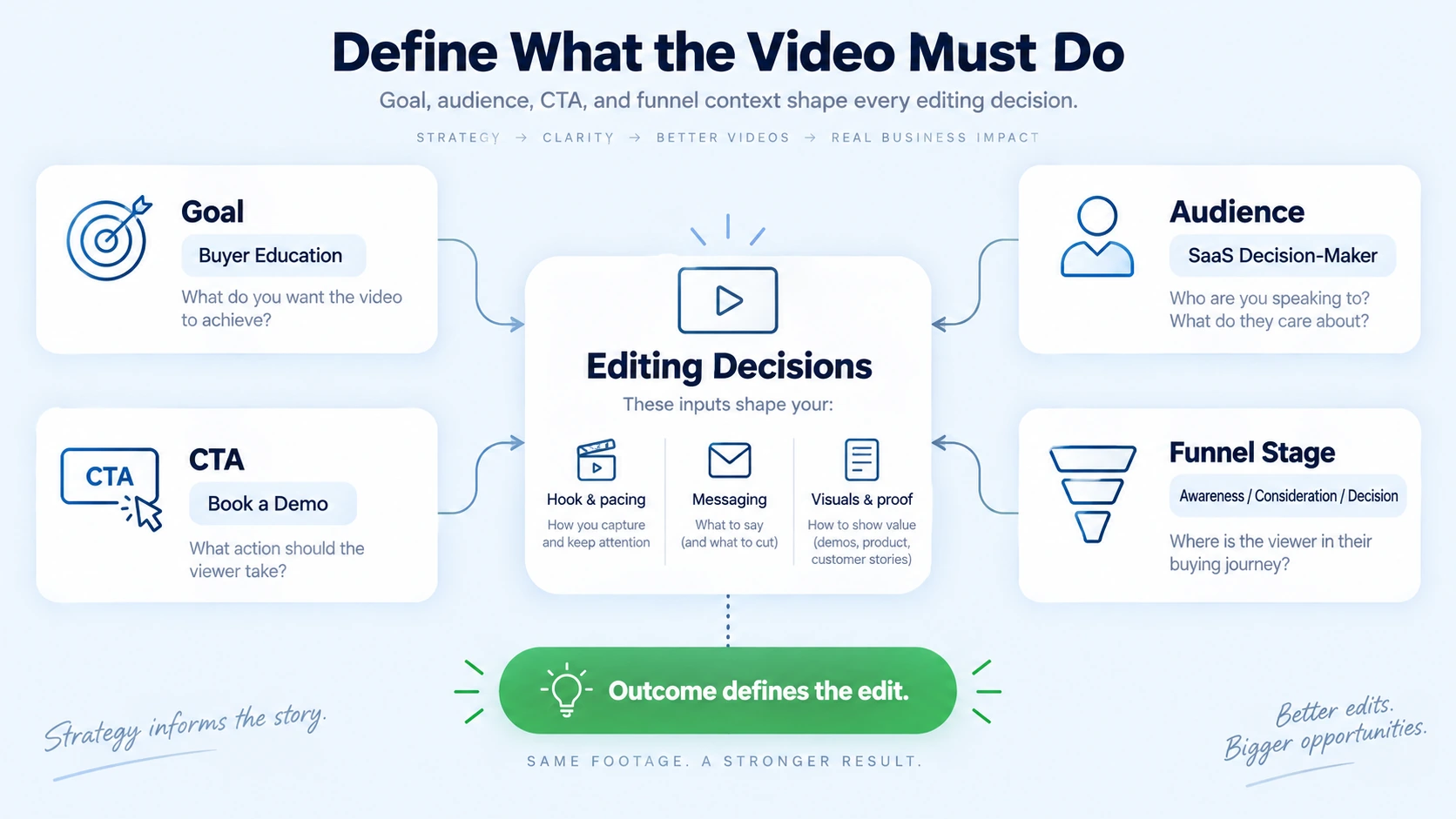
This is one of the video editing brief mistakes that slow you down in 2026 precisely because it doesn't surface until the revision stage. The edit looks fine. But it doesn't drive demo requests, it doesn't communicate the product clearly, and the hook doesn't stop the scroll for your specific ICP.
Every brief should answer:
- Goal: What is this video supposed to do? (Educate a buyer, generate a demo request, support a sales email, build founder authority)
- Audience: Who is watching this, and what do they already believe? (A problem-aware SaaS buyer is different from a brand-new prospect)
- CTA: What action should the viewer take, and how explicitly should it appear on-screen?
- Context: Where in the funnel does this video live? Top-of-funnel awareness and bottom-of-funnel demo support are cut differently.
For teams using a content repurposing strategy, this context travels with every derivative asset. A webinar clip repurposed for LinkedIn needs a different hook than the same clip repurposed for a sales sequence. The brief carries that distinction. Without it, the editor produces one version that fits neither.
Mistake 6: No Storyboard, Script Reference, or Pre-Production Notes
Brands implementing comprehensive pre-production processes, content briefs, storyboarding, shot lists, and style guides, report a 42% improvement in turnaround times, while organized footage management can reduce editing time by 30–50%.
The storyboard approval process is the most underused efficiency lever in short-form video production. Most B2B teams skip it because it feels slow. It isn't. A rough storyboard aligned before editing begins eliminates the most expensive revision type: structural changes to the first cut.
Structural feedback ("can we lead with the product demo instead of the testimonial?") after the editor has built the full sequence wastes hours. Structural alignment before the sequence is built takes 20 minutes.
What a lightweight pre-production note inside your brief covers:
- Intended narrative arc (problem → product → proof → CTA, or another structure)
- Key moments to include and approximate timestamps from raw footage
- Any footage to exclude (legal restrictions, off-brand moments)
- Motion graphics or text overlay requirements
- Voiceover script, if applicable
For teams at Komet Media, this pre-production alignment is built into intake before editing begins, whether the team already has a content library to repurpose or is building new video assets from scratch. A video deliverables checklist tied to the production timeline is the difference between a post-production pipeline that runs and one that idles waiting for decisions.
A new editor needs 3–5 videos to fully learn your style. During that ramp-up period, expect 30–50% longer turnaround and more revision rounds. A brief with pre-production notes compresses that ramp-up curve significantly on every new engagement.
Conclusion
The video editing brief mistakes that slow you down in 2026 are all upstream problems with downstream costs. Fix the brief, and the revision cycle shortens. Shorten the revision cycle, and the content calendar holds. Hold the content calendar, and the pipeline moves.
Key takeaways:
- Define output format, platform, and specs before any footage is sent.
- Attach a Brand Style Guide or minimum style reference to every brief.
- Deliver organized assets and name one approval owner with a defined feedback format.
- Include goal, audience, CTA, and narrative structure, always.
If you want a production system that eliminates these gaps across both original production and video repurposing, explore Komet Media's services.
Frequently Asked Questions
Q1: What should a video editing brief always include?
At minimum: output platform and specs, video goal, target audience, CTA, brand style reference, one named approval owner, revision scope, and organized raw asset delivery. These fields eliminate the guesswork that drives most revision cycles.
Q2: How many revision rounds should a well-briefed video project require?
Projects with clear briefs and minimal revisions maintain their original estimated turnaround at 0–1 revision rounds. Two or more rounds is typically a signal that the brief was missing context, not that the editor made errors.
Q3: Why does short-form video editing have more revision cycles than long-form?
Revision cycles have actually increased for short-form content because higher expectations and faster turnarounds mean more back-and-forth, especially for Shorts and Reels where pacing matters significantly. Tighter formats amplify every brief gap.
Q4: What's the fastest way to reduce video editing turnaround time in 2026?
Consolidate feedback into one timestamped document delivered within 24 hours of the draft, use a structured asset folder, and define your brand style reference before sending footage. These three changes eliminate the most common delays without requiring any new tools.
Q5: Does a content repurposing workflow need a separate brief for each derivative clip?
Yes. A webinar repurposed for LinkedIn, a sales email, and a paid ad serves three different goals with three different audiences. Each derivative asset needs its own goal, CTA, and output spec noted, even if it's a short addendum to the original brief.
Q6: What tools help enforce a clean video editing brief process?
Frame.io handles structured asset delivery and timestamped feedback in one platform. A shared brief template in Notion or Google Docs keeps intake consistent. For teams using Adobe Premiere Pro or DaVinci Resolve, organized project file naming conventions in the brief prevent the "media offline" errors that stall the post-production pipeline entirely.


