
🪄 AI Summary
Heading 1
Heading 2
Heading 3
Heading 4
Heading 5
Heading 6
Lorem ipsum dolor sit amet, consectetur adipiscing elit, sed do eiusmod tempor incididunt ut labore et dolore magna aliqua. Ut enim ad minim veniam, quis nostrud exercitation ullamco laboris nisi ut aliquip ex ea commodo consequat. Duis aute irure dolor in reprehenderit in voluptate velit esse cillum dolore eu fugiat nulla pariatur.
Block quote
Ordered list
- Item 1
- Item 2
- Item 3
Unordered list
- Item A
- Item B
- Item C
Bold text
Emphasis
Superscript
Subscript
What length works best on LinkedIn video? For most organic posts, 30 to 90 seconds. In my experience, teams overthink the exact number and underthink the reason it matters: LinkedIn ranks video partly on completion rate, so a short video watched to the end will outperform a long one abandoned halfway through, every time.
Quick Answer
Most LinkedIn videos perform best between 30 and 90 seconds. Thought leadership content can stretch to two minutes, while ads perform best under 30 seconds.
Why LinkedIn Video Length Is an Algorithm Question, Not Just a Viewer One
LinkedIn's ranking model is built around watch time and completion rate more than almost anything else. Videos under 60 seconds have a 26% higher completion rate than longer videos on LinkedIn, and the platform uses that signal to decide how far to distribute a post beyond the people who already follow you.
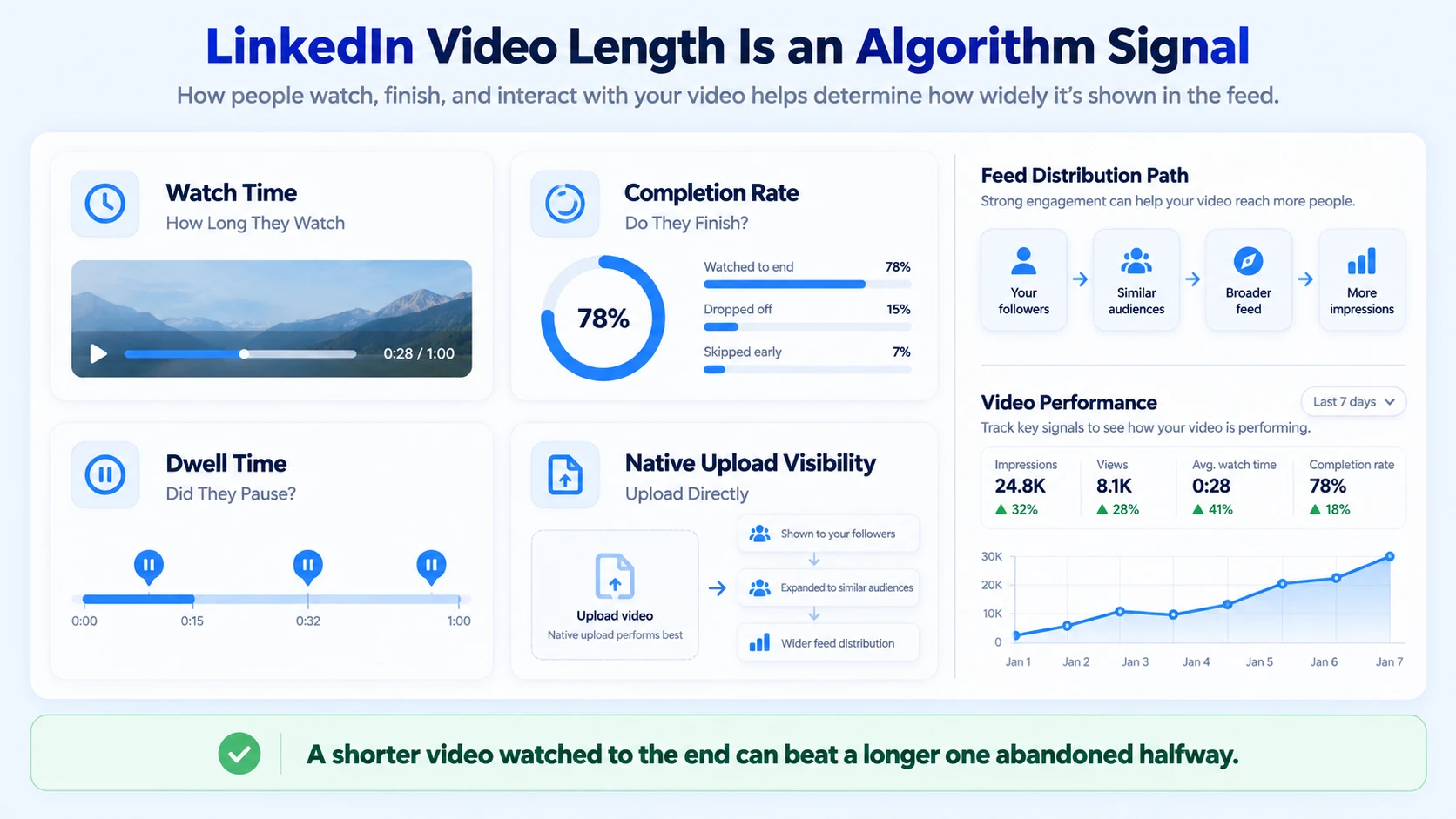
This matters more than most B2B teams expect. LinkedIn also tracks dwell time, comments, and whether a video was uploaded natively rather than linked from YouTube or Vimeo. Native uploads are viewed roughly 52% longer than the same clip posted as a link, with about 42% more visibility on top. Length is one lever among several, but it is the one most B2B teams get wrong first, usually by running long because the recording had more good material than the platform rewards in one post.
For video ads specifically, the pattern is even sharper. Ads under 30 seconds see roughly 200% higher completion rates than longer ads, which is a large enough gap that length becomes the first lever to pull before touching creative or targeting.
I have seen strong founder interviews get cut at three minutes because the team could not bear to lose a good quote, only to watch completion drop sharply well before the video reached its strongest point. A tighter cut almost always outperforms a longer one carrying a weaker average, which is really the practical answer to what length works best on LinkedIn video once the algorithm mechanics are accounted for.
What Length Works Best on LinkedIn Video, by Format and Goal
The right length depends on what the video is trying to do, not a single number that applies everywhere.
Videos over 90 seconds see a sharp drop-off in completion rate on the organic feed, which is why most of the ranges above stay well under the platform's technical ceiling. LinkedIn's maximum upload length is 10 minutes, but the range where the algorithm reliably rewards completion sits closer to 30 seconds to 3 minutes, with vertical native feed content skewing shorter still. The gap between what LinkedIn allows and what actually performs is the part most teams miss when they assume a longer, more thorough video will always do better.
Common Length Mistakes That Hurt LinkedIn Video Performance
Most underperforming LinkedIn videos are not failing because of the message. They are failing because the length does not match what the platform rewards.
The first mistake is the one I see most often with B2B founders repurposing a podcast or webinar. The full segment might be five minutes of good material, but posting all five minutes rarely performs as well as three well-chosen 60-second cuts built around what length works best on LinkedIn video for that specific format.
A Workflow for Finding the Right Length for Your LinkedIn Videos
Platform data is a starting point. This is the process we use to land on what length works best on LinkedIn video for a specific brand's content:
- Start inside the range for the format. Use the table above as the first cut, not the final one.
- Lead with the strongest point. The opening three seconds decide whether the rest gets watched.
- Cut to the shortest version that still lands the idea. A complete 45-second video usually beats a padded 90-second one.
- Upload natively. Never post a LinkedIn video as a link to an external platform.
- Add and correct captions. LinkedIn factors caption presence into how it evaluates a video.
- Check completion rate before publishing the next batch. Let the data adjust the next round of cuts, not a guess.
For teams repurposing a podcast episode or webinar recording, this workflow usually turns one long source into several LinkedIn-ready clips, each cut to the length that fits its specific purpose.
How to Measure Whether the Length Is Working
Views alone say very little about whether a LinkedIn video's length is right.
I would rather look at completion rate across several videos of the same length than judge one post's performance in isolation. A single strong video can be an outlier. A consistent pattern across a batch is what actually tells you what length works best on LinkedIn video for that specific brand and audience.
What a Capable Production Partner Should Handle
Matching every LinkedIn video to the length that performs best is a production discipline that has to happen on every clip, whether you are starting from an existing recording or creating new content from scratch. A capable partner should handle both operational modes:
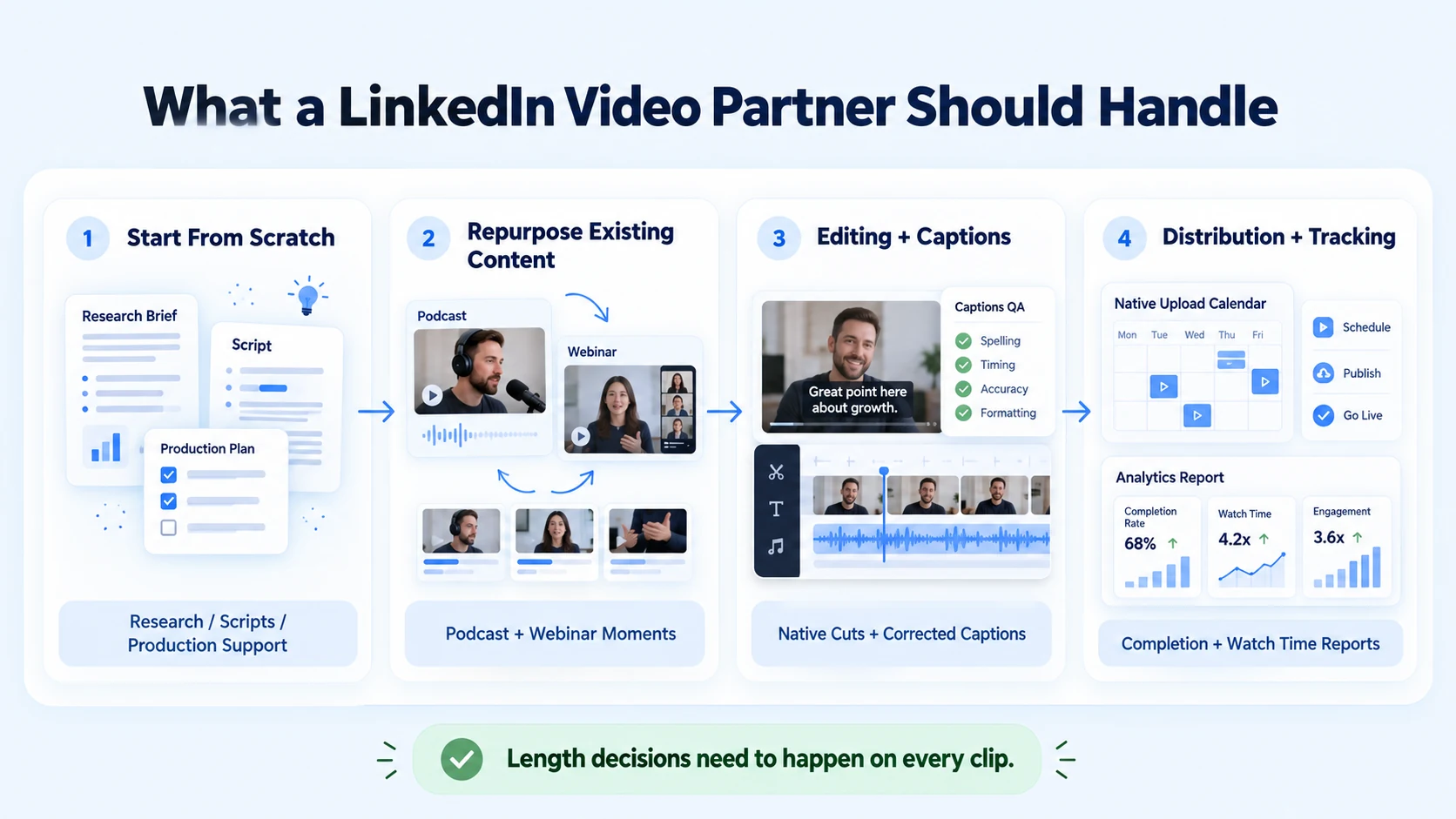
- Starting from scratch (Mode 2): Conducting niche and audience research, writing scripts/briefs, and providing production support for new recordings.
- Repurposing existing content (Mode 1): Extracting key moments from podcast episodes or webinars and cutting each clip to the length that fits its specific format and goal.
- Editing and captions: Adding and correcting captions and uploading natively rather than linking to external platforms.
- Distribution and tracking: Managing channel posting schedules and tracking completion rates and watch time to continuously adjust future cuts.
This full-cycle system is at the core of what we do at Komet Media through our short-form video editing andLinkedIn video work. Whether you already have raw footage or are starting completely from scratch with research, scripting, and production support, we handle the entire workflow to deliver length-appropriate LinkedIn clips that perform.
Conclusion
What length works best on LinkedIn video comes down to matching the format to the data: 30 to 90 seconds for most organic posts, 60 to 90 seconds for thought leadership, under 30 seconds for ads, and a longer runway only for live content. The number matters less than the discipline behind it: cutting to the strongest material, uploading natively, and letting completion rate guide the next round of edits rather than a guess about what feels right.
FAQ
What length works best on LinkedIn video for a typical organic post?
Most organic LinkedIn videos perform best between 30 and 90 seconds, with completion rate dropping sharply past the 90-second mark. Thought leadership content can extend slightly further, up to about two minutes, if the material supports it.
How much does it cost to produce LinkedIn videos cut to the right length?
Cost depends on volume, source material, and how much new recording is needed. Retainer-based production, covering editing, captions, and platform-specific cuts, typically runs in the range of approximately $2,500 to $5,000 a month, though scope changes the final number.
What is the process for finding the right LinkedIn video length for a brand?
The process usually starts with the format's baseline range, leads with the strongest point in the footage, cuts to the shortest complete version, and uploads natively with corrected captions. Reviewing completion rate across a batch of videos guides the next round of cuts.
How long does it take to see whether a LinkedIn video's length is working?
Completion rate and watch time are usually visible within the first few days of a video's posting window. A clearer pattern across a length choice typically takes several videos, often two to three weeks of consistent posting.
What deliverables come with a LinkedIn video length strategy?
A typical deliverable set includes native-length cuts of source material by format, corrected captions, and a short report on completion rate and watch time. Some programs also include recommended length ranges specific to a brand's audience.
Should a freelancer or an agency handle LinkedIn video length decisions?
A freelancer can work well for a single format with a light, predictable volume. An agency tends to hold up better once a brand needs consistent, tested length decisions across organic posts, thought leadership, and ads at the same time.
Do I need existing video recordings to work with Komet Media, or can I start from scratch?
You can start from either point. Komet Media supports teams with existing recordings (repurposing webinars or podcasts) as well as teams starting entirely from scratch (Mode 2), providing niche research, scripting, and production support to build new content from the ground up.
Does Komet Media help brands find the right LinkedIn video length?
Yes. Whether repurposing existing recordings or launching from scratch with research, scripting, and production support, we cut videos into the optimal lengths for LinkedIn, handle native uploads, and track completion rates.Book a call to discuss the right video strategy for your team.


