
🪄 AI Summary
Heading 1
Heading 2
Heading 3
Heading 4
Heading 5
Heading 6
Lorem ipsum dolor sit amet, consectetur adipiscing elit, sed do eiusmod tempor incididunt ut labore et dolore magna aliqua. Ut enim ad minim veniam, quis nostrud exercitation ullamco laboris nisi ut aliquip ex ea commodo consequat. Duis aute irure dolor in reprehenderit in voluptate velit esse cillum dolore eu fugiat nulla pariatur.
Block quote
Ordered list
- Item 1
- Item 2
- Item 3
Unordered list
- Item A
- Item B
- Item C
Bold text
Emphasis
Superscript
Subscript
Knowing how to create impactful case study videos starts with a simple idea: a case study video is not a shorter written case study read aloud. It is a customer explaining a problem, a decision and a result in a way a similar buyer can trust. The best ones are specific, short enough to watch, and edited so that the customer's own words do the persuading. This guide covers choosing the story, a four-part structure, interview technique, production principles, editing, distribution and measurement.
Quick Answer: Creating Impactful Case Study Videos
How to create impactful case study videos: choose a customer with a clear result, interview them for the problem, decision and outcome, use four parts, keep it short, and cut versions for sales and social.
Why Case Study Videos Matter in B2B
B2B purchases involve groups of people, and proof from a peer travels well. The 2025 Edelman and LinkedIn B2B Thought Leadership Impact Report says hidden buyers, who influence a purchase without being the named decision-maker, consume thought leadership as actively as target buyers, and notes that more than 40% of B2B deals stall because of internal misalignment, citing The JOLT Effect (2022). A case study video is easy to forward to a colleague who missed the demo, and that makes it useful for building internal agreement.
Teams are investing in customer proof. Wistia's 2026 State of Video report, a survey of 900-plus professionals, found that the share of teams planning customer testimonial videos rose from 17% in 2023 to 37% in 2024, 38% in 2025 and 47% in 2026. Wyzowl's 2026 survey, based on 266 respondents surveyed in late 2025, found that 57% of video marketers have created testimonial videos. Both are survey figures from different audiences, so I would read them as evidence that the format is mainstream, not as proof of results. Neither report tells you how well case study videos convert, and I have not found a reliable primary source that does, so measure it in your own funnel.
Choose the Right Customer and Story for Case Study Videos
Not every happy customer makes a good video, and how to create impactful case study videos begins with selection. Pick on four criteria.
- A clear before and after. The customer can describe a specific problem and a specific change.
- A result you can state. A number, a time saved or a decision made. If a figure is used, get written approval and its source.
- A fit with your target buyer. The customer's role, industry and company stage should resemble the buyers you want.
- A willing speaker. Someone who talks naturally and has permission from their employer.
Avoid customers whose story only works with confidential details they cannot share. Also avoid the temptation to use the biggest logo if its story is generic. A smaller customer with a specific, relatable result often persuades more.
Ask for approval early. Larger companies often have legal and communications review, and that can take weeks. Start the request before you schedule the shoot.
The Four-Part Structure for Case Study Videos
A simple structure keeps the story clear.
Keep each part short. In a two-minute video, context and challenge may take thirty seconds together, the solution forty, and the result the rest. Put the strongest line from the results near the start as a hook, then tell the story in order.
Do not spend the video describing your product. Describe the customer's situation and decision. The product appears as part of their story.
Plan the Interview: The Core of How to Create Impactful Case Study Videos
The interview produces the raw material, so most of the quality comes from the questions and the setting.
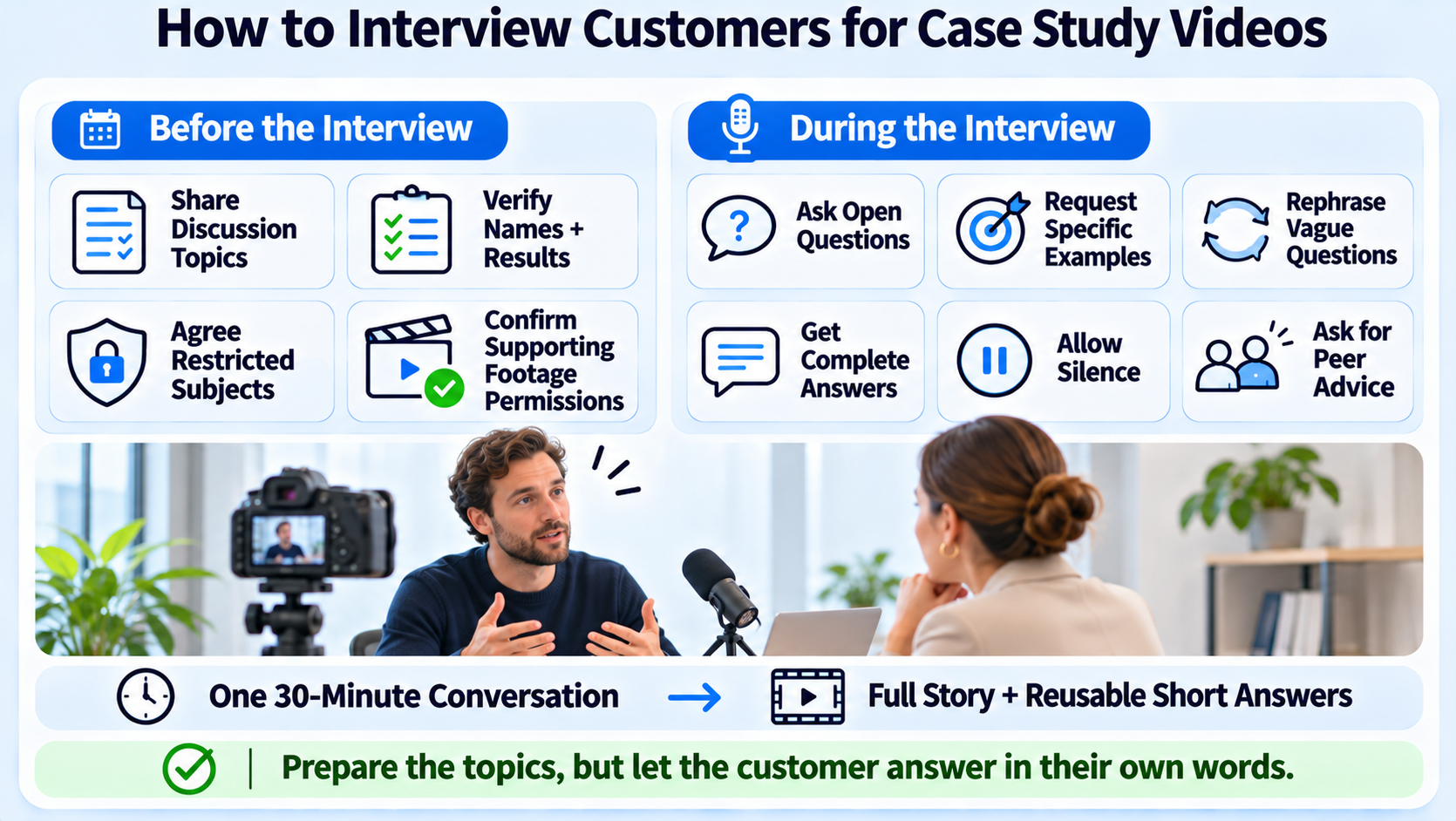
Before the shoot
- Share the questions in advance as topics, not scripts. Scripted answers sound stiff.
- Confirm the speaker's title, the spelling of names and the figures they will cite.
- Agree on what cannot be said, such as pricing or unreleased features.
- Collect b-roll permissions: office, product screens, team footage.
During the interview
- Ask open questions: "What was happening before you looked for a solution?"
- Ask for specifics: "Can you give an example?" "What did that cost you?"
- Ask the same question twice in different ways if the first answer is vague.
- Ask them to answer in full sentences that restate the question, so the clip makes sense on its own.
- Leave silence after answers. People often add the best line when you wait.
- Finish with a closing question such as "What would you tell a peer considering this?"
Record more than you need. A thirty-minute interview often holds several usable answers, and you may cut separate clips from the same session.
Production Principles for Case Study Videos
You do not need a studio. You need clean sound, steady framing and a speaker who feels at ease.
- Audio first. Use a lavalier or close microphone and record in a quiet room. Poor audio is the fastest way to lose a viewer.
- Simple framing. Eye-level camera, a tidy background and a consistent setup if you are shooting a series.
- Natural light. A window or soft light from the side beats overhead office lighting.
- Two angles if possible. A second camera gives editing options without a jump cut every cut.
- B-roll with purpose. Show the product in use, the team at work or the dashboard the customer mentions. Do not add generic stock footage.
- Remote interviews. Record locally on each side if the tool allows, and ask the customer to use headphones.
If you want an editor involved, video editing services cover the cut, captions and exports.
Edit Case Study Videos for Clarity and Attention
Edit the story, not the footage.
- Build the spine first. Choose the best answers for each part of the structure and put them in order.
- Cut the preamble. Remove the customer's warm-ups, repeated phrases and long pauses.
- Add captions. Many people watch without sound. Check names, figures and product terms.
- Show the result visually. Use a simple graphic for a key figure, with the source credited.
- Keep the pace. For web and sales, one to three minutes covers most stories. Wistia reports that videos under five minutes get the best engagement for most formats, which supports keeping case study videos short. That is platform data from Wistia-hosted videos, so it is context, not a rule.
- Close with one action. A link to the full written case study, a demo page or a reply to a sales rep.
Review the cut with the customer before release. Get written approval for the final version, including any figures and logos.
One Interview, Several Case Study Video Assets
A single interview should produce more than one video.
Wistia's report says that among teams repurposing video into clips, 67% post to LinkedIn, 49% to Instagram, 41% to YouTube and 34% to Facebook, and 76% adjust aspect ratio by platform. It is survey data from Wistia's respondents, so it describes practice. Use it as a reminder to plan versions at the start. Our guide to case study videos for B2B buyers and customer testimonial videos for B2B cover the formats in more depth.
A Case Study Video Production Timeline
Case study videos slow down at approvals, not at editing. This sequence assumes one customer story and a small team. The durations are planning aids I use for scheduling, not benchmarks.
Start permission first. If you want to know how to create impactful case study videos on a schedule, the lesson is that the earliest step is the one most likely to delay you.
Question Templates for Case Study Video Interviews
Use these as prompts and adapt them to the customer.
Context. "Tell me about your role and what your team is responsible for." "What was going on in the business when you started looking?"
Challenge. "What was not working?" "What did it cost you in time, money or risk?" "What had you tried before?"
Solution. "Why did you choose this approach?" "Who else was involved in the decision?" "What nearly stopped you?"
Results. "What changed after you started?" "Can you give a specific example?" "What would you tell a peer in a similar role?"
Add one question about the future: "What are you planning next?" It gives you an ending that looks forward, and it tends to produce natural, unscripted answers. Check any figure the customer gives with a document or an email afterwards. Never publish an unconfirmed number.
How to Create Impactful Case Study Videos Without a Large Budget
You can make a credible video with a small kit and a clear plan.
- Remote interview. Record the customer on a video call with local recording, and capture screen footage with their permission.
- Screen and voice. If the customer prefers not to appear on camera, use audio from the interview over product footage and captions. This works best for technical stories.
- Reuse existing material. A webinar where the customer spoke, a conference panel or a recorded call can be cut into a story if rights allow.
- Quote carousel first. If you lack video, start with a carousel of customer quotes and results, then add video as the relationship grows.
Whatever the route, protect audio quality and get written permission. A modest video with clean sound and a clear result beats a more expensive one with a vague story.
Written, Video, or Both
Many teams ask whether the video should replace the written case study. I would use both. The written version suits search, sharing in documents and procurement packs. The video suits sales conversations, social and quick proof. Produce them from the same interview, so the facts match. Link each to the other, and keep the figures and wording consistent.
Getting Customers to Say Yes to a Case Study Video
Customers decline because of time, risk and unclear benefit. Reduce all three.
- Offer a short interview slot and keep the promise.
- Show a draft of the final cut and accept edits.
- Explain how it will be used and where.
- Offer a benefit that matters to them, such as visibility for their own brand or an introduction to a relevant audience.
- Ask for permission in writing and keep a record.
Do not pressure customers or imply that renewal depends on participation. Their goodwill is the asset.
Distribute Case Study Videos With Intent
A case study video that sits on a page few people visit does little. Plan distribution before you film.
- Sales: Give reps a short link and a one-line summary of who it fits. Ask them to send it after relevant calls.
- Website: Place the video near the written case study and on pages where the buyer decides, such as pricing or product pages.
- Email: Include the clip in nurture sequences for the segment that matches the customer.
- Social: Publish the short proof clip with a caption that states the result and the customer's role.
- Customer: Share the final video with the customer and invite them to post it. Their network is a credible audience.
- Events and webinars: Use clips as proof points in presentations.
Credit the customer clearly and respect any usage limits agreed in writing.
Measure What Matters for Case Study Videos
Match metrics to purpose and read several signals together.
- Attention: views, average watch time and completion on each placement.
- Engagement: shares, saves, comments and replies.
- Commercial: clicks to the case study or demo, sales conversations that mention the video, and use by sales in follow-ups.
- Pipeline: opportunities where a case study video was viewed before a meeting. Attribution is imperfect, so ask prospects and log the answers.
Review after thirty and ninety days. Look at which parts of the story people drop off and edit future versions accordingly.
Common Mistakes When Learning How to Create Impactful Case Study Videos
- Starting with the product. Start with the customer's situation.
- Choosing the wrong customer. A big name with a vague story helps less than a specific one.
- Over-scripting. Memorized lines sound rehearsed and hurt trust.
- Skipping approvals. Late legal review can sink a finished video.
- Making it too long. Cut to the story's essentials and use chapters or clips for detail.
- Publishing once. Plan versions and channels from the start.
- Unsourced numbers. If a figure appears, show where it came from and who approved it.
Case Study Video Formats and When to Use Each
Not every story needs the same format. Pick the one that fits the audience and the evidence.
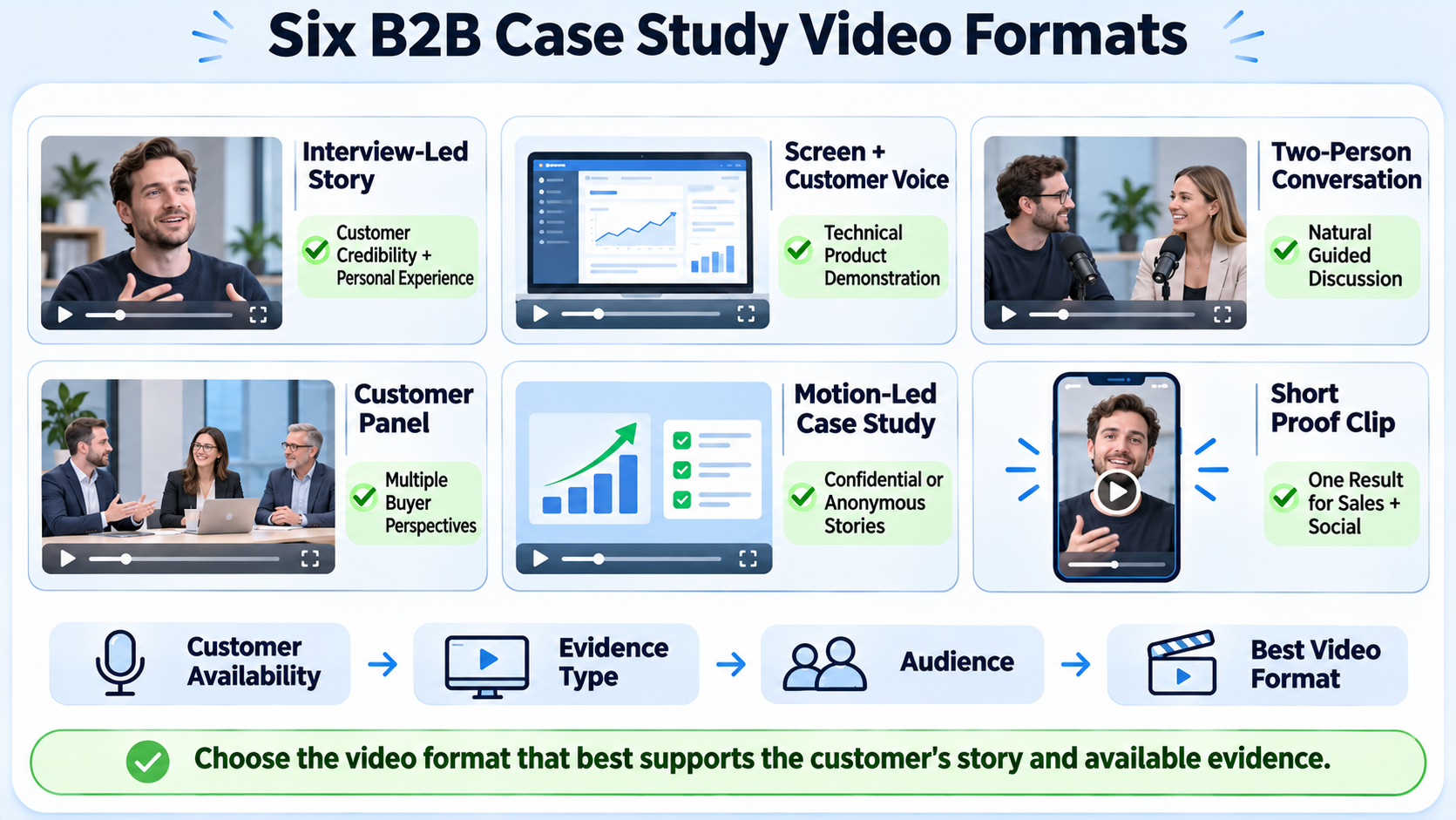
Interview-led story. A customer speaks to camera, with cutaways. Best for stories where the customer's judgment and voice carry the persuasion.
Screen and voice. The customer narrates over product footage or a dashboard. Best for technical products and customers who prefer not to appear on camera.
Two-voice conversation. A host and the customer talk through the story. It feels natural and helps customers who find monologues hard.
Panel or roundtable. Several customers discuss a shared problem. It spreads the proof across roles but needs careful editing to stay focused.
Animated or motion-led summary. Voiceover and motion graphics present results. Best for confidential cases where the customer cannot appear, though it carries less personal credibility.
Short proof clip. Twenty to forty-five seconds with one result. Best for social, ads and sales follow-ups.
Choose the format at the start, because it affects interview style, equipment and edit time.
Evidence Standards: What to Show and What to Source
A persuasive case study video is credible because the proof holds up.
- State what the number measures. "Reduced review time" means little without the before and after and the period.
- Name the source. Customer-provided figures should be confirmed in writing, and the video should say that the customer reported them where relevant.
- Avoid causation claims that the customer cannot support. If other changes happened at the same time, the video should not imply the product alone caused the result.
- Show the context. Company size, role and use case help buyers judge fit.
- Keep the language measured. Superlatives reduce trust.
- Keep an evidence file with approvals, source documents and release forms.
Also make sure that any claim fits the rules for advertising and testimonials in your market. I am not a lawyer, so ask counsel about your specific use.
Working With Legal and Customer Communications
Large customers have rules about public statements. Plan for them.
- Ask early who needs to approve and how long it takes.
- Provide a one-page brief of what will be said, where it will be used and for how long.
- Send drafts rather than finished cuts when possible.
- Agree on edits to wording, logos and claims.
- Keep records of approvals and agreed limits.
- Respect expiry dates and remove content when permission ends.
If a customer declines, offer alternatives such as an anonymous story, a written quote or a joint webinar.
Equipment and Setup Checklist
A simple kit covers most case study shoots.
- Camera or recent phone with a stable mount.
- Lavalier or shotgun microphone, plus a backup recorder.
- Soft light source or window light.
- Headphones for monitoring audio.
- Extra batteries and storage.
- A list of questions and a release form.
- A quiet room and a plain background.
For remote interviews, ask the customer to use headphones, a quiet room and a wired connection if possible. Record locally on both sides where the tool allows it.
Measuring Case Study Video Performance by Placement
Different placements need different metrics.
Review results by placement at thirty and ninety days. If a placement is not producing signals, change the thumbnail, the opening or the placement itself before concluding the story is weak.
Conclusion: Case Study Videos That Persuade
To create impactful case study videos, pick a customer with a specific story, structure the interview around context, challenge, solution and results, and edit for clarity before polish. Plan the clips and the distribution when you plan the shoot, and measure the effect in your own funnel since public benchmarks on conversion are thin. A small set of strong customer stories, well distributed, usually does more than a long list of generic ones.
FAQs on Case Study Videos
What is a case study video?
It is a short video in which a customer explains a problem, the decision they made and the result, in a form that similar buyers can use to judge your offer.
How much does it cost to produce a case study video?
Cost depends on the number of interviews, locations, cameras, editing complexity, graphics and revision rounds. Komet Media's typical working range for ongoing B2B retainers is roughly $2,500 to $5,000, with final pricing based on scope and volume.
How long should a case study video be?
When you work out how to create impactful case study videos, one to three minutes covers most stories on a website or in sales. Shorter clips of twenty to forty-five seconds suit social platforms.
How long does production take?
Plan for scheduling and customer approvals, which often take longer than the edit. Ask your partner for timelines by stage.
What deliverables should I expect?
A full story video, short clips, captions, platform exports, thumbnails and a version for sales.
Should I use a freelancer or an agency?
A freelancer can handle a single video. An agency suits teams that want planning, interviewing, editing and distribution handled together.
Should this be in house or outsourced?
Keep customer selection and relationship in house. Outsource filming and editing if capacity or skill is limited.
How does Komet Media help with case study videos?
Komet Media creates case study videos from scratch, from planning and interview direction to editing, and also repurposes existing customer interviews into short clips and sales assets for B2B teams, with distribution support.


