🪄 AI Summary
Heading 1
Heading 2
Heading 3
Heading 4
Heading 5
Heading 6
Lorem ipsum dolor sit amet, consectetur adipiscing elit, sed do eiusmod tempor incididunt ut labore et dolore magna aliqua. Ut enim ad minim veniam, quis nostrud exercitation ullamco laboris nisi ut aliquip ex ea commodo consequat. Duis aute irure dolor in reprehenderit in voluptate velit esse cillum dolore eu fugiat nulla pariatur.
Block quote
Ordered list
- Item 1
- Item 2
- Item 3
Unordered list
- Item A
- Item B
- Item C
Bold text
Emphasis
Superscript
Subscript
Instagram has become one of the strongest platforms for event marketing because it helps people see the experience before they buy a ticket.
A good event campaign does more than announce the date, venue, and speaker list. It builds curiosity, creates trust, answers objections, and makes people feel like they will miss something valuable if they do not attend.
Many event pages still depend on one poster, a few reminder posts, and a link in bio. That approach rarely works well now. People scroll fast, compare options, forget dates, and delay decisions.
The goal is simple: make the event feel real before the doors open. Show the value. Show the people. Show the energy. Show what attendees will gain. When your audience can picture themselves at the event, ticket sales become much easier.
This guide explains how to use Instagram to promote an event, build demand, and sell more tickets before event day.
Start With a Clear Event Promise
Before you post anything, define the main objective of your event. This is the reason someone should care. Your event name may sound interesting, but the promise tells people what they will learn, experience, or walk away with.
For example,
“Marketing Workshop 2026” sounds flat.
“Build a 30-day Instagram content plan in one afternoon” gives people a clear reason to attend.
“Founder Networking Night” sounds generic.
“Meet early-stage founders, exchange practical growth lessons, and leave with useful business connections” makes the value easier to understand.
Your Instagram content should repeat this promise in different formats. Use it in your bio, announcement post, Reels, Stories, speaker posts, ads, and ticket page. People should understand the event within a few seconds of landing on your profile.
.jpeg)
Build a Campaign Timeline Instead of Posting Randomly
Event promotion works better when you plan it as a campaign. A campaign helps you move people from awareness to interest to ticket purchase. Without a timeline, your content can feel repetitive because every post says the same thing: “Book now.”
Start promoting early enough to give people time to decide. If your event needs travel, budget approval, team planning, or schedule changes, begin at least 6 to 8 weeks before the event. Smaller local events may need a shorter timeline, but even then, a structured plan will help.
Here is a simple event marketing timeline:
This structure gives every post a job. Early posts help people discover the event. Middle-stage posts help them understand the value. Final-week posts push people to take action.
Optimize Your Instagram Profile for Ticket Sales
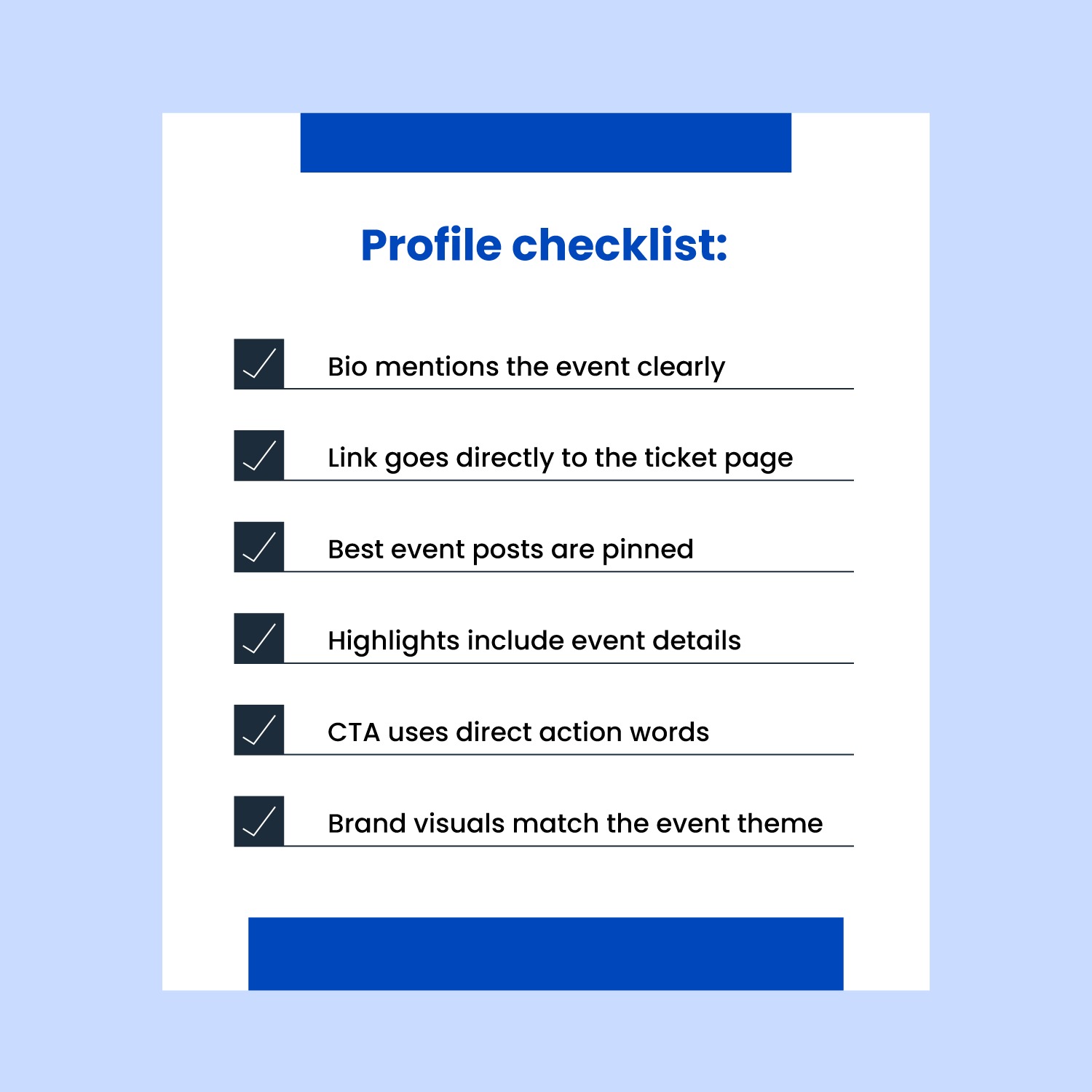
Your Instagram profile should work like a mini landing page during your event campaign. A person may discover your event through a Reel, tap your profile, and decide within seconds whether to learn more. If your profile looks unclear, you may lose that sale.
Update your bio before you start promoting. Mention the event clearly, especially if it is your main focus for the month. Add the date, location, and target audience if space allows. Your link in bio should take people directly to the event page, not a general website homepage.
Use clear CTA buttons in your link-in-bio tool. “Book tickets,” “Register now,” “Save your seat,” or “Join the workshop” works better than vague text like “Learn more” or “Click here.”
Also pin your best event posts to the top of your profile. Use one pinned post for the event announcement, one for the speaker or agenda, and one for proof or FAQs. A new visitor should understand the event, trust the value, and know where to buy a ticket without scrolling too much.
Create an Announcement Post That Gives People a Reason to Care
Your event announcement post should not just say that registrations are open. It should help people understand why the event deserves their time and money. The creative should catch attention, and the caption should explain the value.
Keep the design clean. Do not squeeze the entire agenda, speaker list, venue address, pricing, and sponsor logos into one graphic. Use the creative to highlight the core promise. Use the caption for details.
A strong announcement caption can follow this structure:
- Start with the event promise
- Explain who should attend
- Mention the main benefits
- Add date, time, and location
- Include a direct CTA
Example:
“Join us for a live Instagram marketing workshop built for small business owners who want a clearer content plan.
In one session, you’ll learn how to plan Reels, use Stories to build trust, create content that supports sales, and track what is actually working.
Best for founders, marketers, coaches, consultants, and service providers.
Date: July 18
Location: Bengaluru
Seats: Limited
Book your ticket through the link in bio.”
This kind of post gives people enough information to take interest without overwhelming them.
Use Reels to Sell the Experience
Reels should play a major role in your event promotion plan because they help you reach people outside your follower base. Posters can inform people, but Reels can make them feel the event. They can show the speaker’s personality, the venue, the audience, the topic, and the energy behind the event.
The strongest event Reels usually answer a question, show proof, or create desire. You do not need a highly polished video every time. A speaker talking directly to the camera, a venue walkthrough, a planning clip, or a short recap from a previous event can perform well when the message is clear.
Example: https://www.instagram.com/reel/C7Q5Rl9Czpx/?igsh=MXA2d2t0cmx5bndiMA==
Use Reels to show:
- Who the event is for
- What attendees will learn
- Why the topic matters now
- What the venue looks like
- Who the speakers are
- What happened at past events
- What the ticket includes
- Why seats are limited
- What attendees can expect on the day
Here are a few Reel ideas:
Use Stories to Keep the Event Visible
Stories help you stay present without overloading your feed. They work especially well for event marketing because they feel immediate and informal. You can use them to remind people, answer questions, show progress, and guide interested followers into DMs.
During the early stage, use Stories to announce the event, ask topic-related questions, share planning updates, and introduce the theme. In the middle stage, share speaker clips, agenda highlights, ticket reminders, polls, FAQs, and partner mentions. In the final week, use Stories for countdowns, last-seat updates, venue details, travel reminders, and setup clips.
Interactive stickers can make your Stories more useful. Use polls to understand interest, question boxes to collect doubts, countdown stickers to create reminders, and link stickers to send people to the ticket page.
Story prompt examples:
- “Want the full agenda? Reply AGENDA.”
- “Are you joining us live?”
- “Which session are you most excited about?”
- “Need help deciding if this event is right for you? DM us.”
- “Tap the countdown to get reminded before registrations close.”
Stories can also turn silent interest into direct conversation. Many people will not comment publicly, but they will reply to a Story if the prompt feels easy.
Use Countdown Stickers and Real Deadlines
Countdowns help people act before they forget. Many people feel interested when they see an event, but they delay the decision. A countdown gives them a reason to come back and book.
Use countdowns for early-bird deadlines, registration closing dates, speaker reveals, agenda launches, and event day. Do not save countdowns only for the final 24 hours. Build them into the campaign so people get used to the timeline.
A countdown works better when you connect it to value. Instead of saying, “Only 2 days left,” say, “2 days left to book your seat for the workshop where you’ll build your 30-day Instagram plan.” This reminds people why the deadline matters.
Use real urgency only. If seats are limited, say so. If early-bird pricing ends on a specific date, mention it clearly. Avoid fake scarcity because it damages trust and makes future campaigns weaker.
Use Collab Posts to Reach New Audiences
Collab posts can expand your reach quickly because the same post appears on your profile and the collaborator’s profile. This helps you tap into the audience of speakers, sponsors, venue partners, performers, community partners, and co-hosts.
Use Collab posts for speaker announcements, agenda reveals, event Reels, panel introductions, sponsor spotlights, and past-event recaps. A speaker announcement works especially well because it gives the speaker a natural reason to share the post with their audience.
Make promotion easy for collaborators. Send them caption options, graphics, Reel prompts, event details, ticket links, discount codes, and suggested posting dates. Do not expect busy speakers or partners to create content from scratch.
Partner kit checklist:
- Event overview
- Approved captions
- Speaker-specific graphics
- Story templates
- Ticket link
- Discount code
- Suggested posting dates
- Hashtags and tags
- Brand guidelines
This keeps the campaign consistent and increases the chance that partners will actually post.
Turn Speakers Into Pre-Event Content
Speakers should not appear for the first time on event day. Use them as part of your Instagram campaign weeks before the event. A speaker-led Reel or Q&A can build trust faster than a standard event graphic.
Ask each speaker to record short videos with simple prompts. These clips can become Reels, Stories, ads, and email content. You can also cut longer speaker interviews into multiple short posts.
Speaker prompts:
- What will attendees learn from your session?
- Who should attend this event?
- What is one mistake people make in this area?
- What are you most excited to discuss?
- What should attendees think about before they come?
- Why does this topic matter right now?
Speaker content works because it gives potential attendees a preview. If someone likes the speaker’s short video, they may feel more confident buying a ticket.
Show Proof From Past Events
Proof helps people trust that your event will deliver. If you have hosted events before, use photos, clips, attendee reactions, testimonials, survey feedback, speaker moments, and crowd shots throughout your campaign.
A past-event Reel can work better than a new poster because it shows real people in a real setting. It helps potential attendees imagine themselves there. If your last event had strong attendance, good feedback, or memorable moments, show it.
If this is your first event, use other trust signals. Highlight speaker credibility, partner credibility, community interest, waitlist numbers, founder expertise, or behind-the-scenes planning. You can still build confidence even without past event footage.
Proof content can include:
- Attendee testimonials
- Speaker credentials
- Partner logos
- Recap clips
- Photos from previous events
- Community comments
- Screenshots of positive DMs
- Media mentions
- Registration milestones
Create Content for Different Buyer Stages
People do not buy tickets at the same speed. Some people hear about the event for the first time and need context. Some already feel interested but need more details. Others are close to buying but need one final nudge.
Your Instagram campaign should support each stage. This helps you avoid repeating “Book now” in every post.
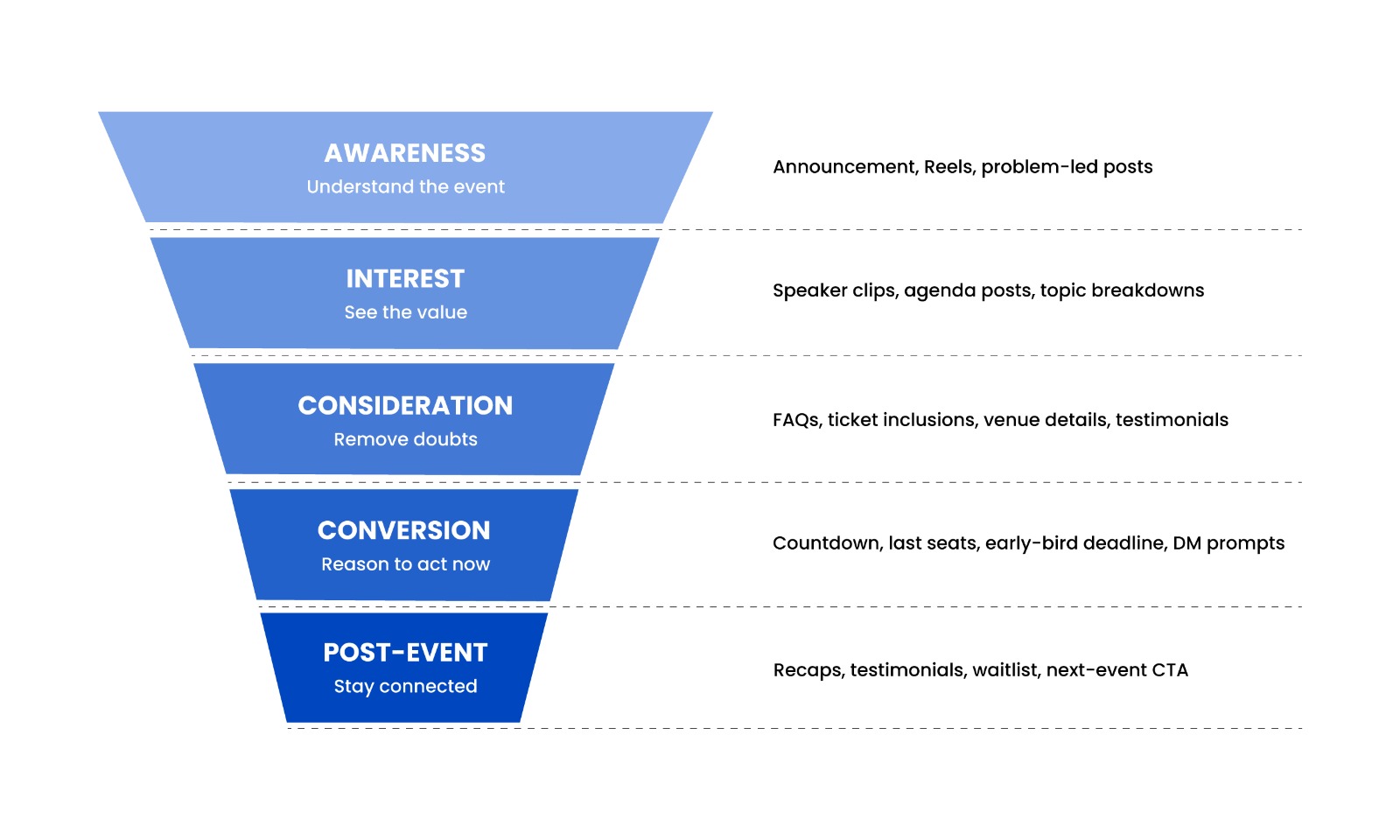
This approach makes your content more useful. A first-time viewer may need the basic promise. A warm lead may need ticket details. A nearly-ready buyer may need to know that registrations close soon.
Use Highlights as an Event Information Hub
Instagram Highlights can act like a simple event hub on your profile. They help people find important information without scrolling through older posts or Stories.
Create a dedicated Highlight for the event and place it near the front of your profile. Add the most useful Stories there, including the event overview, date, venue, agenda, speakers, tickets, FAQs, parking details, and past-event proof.
Keep your Highlight covers simple. Use labels like Event, Agenda, Speakers, Tickets, FAQs, and Venue. A visitor should be able to tap through and understand the event quickly. They may not have seen your earlier posts, so highlights help them catch up.
Make Ticket Buying Easy
Instagram can build demand, but your ticket path needs to close the sale. If the buying process feels confusing, people may drop off even after showing strong interest.
Send people directly to the event page. Do not send them to a homepage where they have to search for the event. Use a clear link in bio, Story Link Stickers, caption CTAs, and DM replies with the ticket link.
Check the ticket page on mobile before the campaign begins. Most Instagram users will tap from their phone. The page should load fast, explain the event clearly, show the price, highlight what the ticket includes, and make checkout simple.
Ticket path checklist:
- Direct event link in bio
- Clear CTA text
- Mobile-friendly ticket page
- Fast-loading checkout
- Visible date, time, and location
- Clear pricing
- Simple registration steps
- Confirmation email after purchase
Every extra click creates friction. Keep the path short.
Use DMs to Convert Interested People
DMs can help you sell tickets because they let you answer personal doubts. Some people need one small answer before they book. They may want to know if the event suits beginners, if group tickets are available, if parking exists, or if they can attend online.
Use Stories and captions to invite DMs. Keep the prompts simple and specific.
Examples:
- “Reply AGENDA and we’ll send the full schedule.”
- “DM us your role, and we’ll tell you if this event is a fit.”
- “Reply TICKET if you want the registration link.”
- “Need help convincing your team? DM us.”
When someone replies, answer clearly and guide them to the next step. Do not send a cold sales pitch. Give the information they asked for and make the ticket link easy to access.
You can also turn common DM questions into content. If several people ask about the agenda, create a carousel. If people ask about parking, post a Story. If people ask who should attend, make a Reel.
Use Paid Ads After You See Organic Signals
Paid ads can support event ticket sales, especially when you have a clear audience and a strong offer. Start with organic content first so you can see which messages get attention. Once you know which Reels, speaker clips, or proof posts perform well, promote the strongest ones.
Retargeting works well for event campaigns. People who watched your Reels, visited your profile, clicked your link, or engaged with your posts already know something about the event. A reminder ad can bring them back before the deadline.
Ad audiences to test:
- Instagram engagers
- Website visitors
- Email list
- Past attendees
- Local audience around the venue
- People interested in your event topic
- Lookalike audience from past buyers
Ad content should stay clear. Do not overload the creative. Lead with the event promise, mention the date and location, and use a direct CTA.
Create Urgency Without Sounding Desperate
Urgency helps ticket sales when it feels genuine. Use deadlines and limited availability honestly. If early-bird pricing ends Friday, say it. If only 20 seats remain, say it. If registrations close at midnight, say it.
Avoid panic-heavy captions that make the event sound weak. You do not need to beg people to attend. Remind them of the value and give them a clear reason to act now.
Good urgency examples:
- “Early-bird pricing ends this Friday.”
- “Only 20 seats left for the live workshop.”
- “Registration closes tonight at 11:59 PM.”
- “Final chance to join the speaker-led Q&A.”
- “Last day to book before the attendee list closes.”
Urgency works best near the end of the campaign, after you have already explained the value.
Capture Event-Day Content for Future Sales
Event-day content should support the current event and your next one. Capture Stories, Reels, attendee reactions, speaker clips, crowd shots, behind-the-scenes moments, sponsor booths, networking moments, and key takeaways.
Assign someone to capture content instead of leaving it to chance. You will need vertical videos, photos, short testimonials, and behind-the-scenes clips. These assets can fuel your next event campaign.
Content to capture on event day:
- Venue setup
- Registration desk
- Attendee arrivals
- Speaker moments
- Audience reactions
- Networking clips
- Sponsor interactions
- Short attendee testimonials
- Closing moments
- Team behind the scenes
After the event, create a recap Reel within 24 to 48 hours. Tag speakers, partners, sponsors, and attendees where appropriate. Add a CTA for the next event, newsletter, community, or waitlist.
Final Checklist for Selling Out an Event on Instagram
Before you launch the campaign, make sure you have the basics ready.
A good Instagram campaign makes the event easy to understand, easy to trust, and easy to book. When people see the value repeatedly across Reels, Stories, posts, DMs, and partner content, they feel more confident taking action.
Conclusion
Instagram can help you sell out an event before the doors open, but only when you use it with a clear campaign plan. Start with a strong event promise, build your timeline, optimize your profile, and create content that supports every stage of the buyer journey.
Use Reels to reach new people, Stories to keep momentum, Collab posts to expand reach, Highlights to organize information, and DMs to answer doubts. Add proof, speaker content, countdowns, and real urgency as the event gets closer.
The best event campaigns do not depend on one announcement post. They build interest over time and make the experience feel valuable before anyone arrives.
When your Instagram content shows people what they will gain, who they will meet, and why they should book now, selling tickets becomes much easier, to book a strategy call for event marketing on instagram.
Want to sell more event tickets through Instagram?
Komet Media helps event brands plan Instagram campaigns that build interest, create urgency, and turn attention into registrations. Book a strategy call for Instagram event marketing.