
🪄 AI Summary
Heading 1
Heading 2
Heading 3
Heading 4
Heading 5
Heading 6
Lorem ipsum dolor sit amet, consectetur adipiscing elit, sed do eiusmod tempor incididunt ut labore et dolore magna aliqua. Ut enim ad minim veniam, quis nostrud exercitation ullamco laboris nisi ut aliquip ex ea commodo consequat. Duis aute irure dolor in reprehenderit in voluptate velit esse cillum dolore eu fugiat nulla pariatur.
Block quote
Ordered list
- Item 1
- Item 2
- Item 3
Unordered list
- Item A
- Item B
- Item C
Bold text
Emphasis
Superscript
Subscript
The best app preview videos do one job: they show a stranger, in under thirty seconds and usually with the sound off, what the app does and why it matters. For B2B and AI-Native apps, that means showing a real workflow, not a mood film. This guide covers the platform rules, a shot-by-shot structure, quality criteria, a testing method, and common mistakes, so your preview earns installs instead of decoration.
Quick answer
The best app preview videos open on the core action, show real in-app footage, use readable on-screen text for muted playback, and tell one clear story. Test them against your current page instead of trusting taste.
Why the preview matters for B2B and AI apps
A product page has a few seconds to answer three questions: what is this, is it for me, and can I trust it. Screenshots answer the first two in still form. A short video can show a workflow, which matters for apps whose value is a sequence of steps rather than a single screen.
For B2B, productivity, fintech, and AI apps, I think the preview does extra work, and the best app preview videos in those categories show a workflow rather than a feature list. Buyers cannot judge an AI feature from a static screen. They need to see input, processing, and output in one flow.
One caution: I could not find reliable public data that measures how much a preview lifts conversion. One vendor guide I reviewed describes the preview as a question for a test, not taste, and it gives no preview-specific lift figure. I will not invent one. What I can give you is the platform rules, the structure I follow, and a way to measure your own result.
What Apple requires and recommends
Apple's guidance on app previews sets limits that shape every strong preview.
Two points matter most for B2B teams. First, do not film hands, devices, or over-the-shoulder shots, because Apple asks for in-app capture only. Second, the muted default means captions and on-screen copy carry the message.
What Google Play requires and recommends
On Android, the approach is different. Google Play Console help says the preview video comes from a YouTube URL.
If you plan one master video for both stores, I would build it around the stricter limits: first action within ten seconds, mostly real footage, and no dated or price-based text.
What the best app preview videos have in common
After reviewing the rules and the common patterns, I look for seven traits.
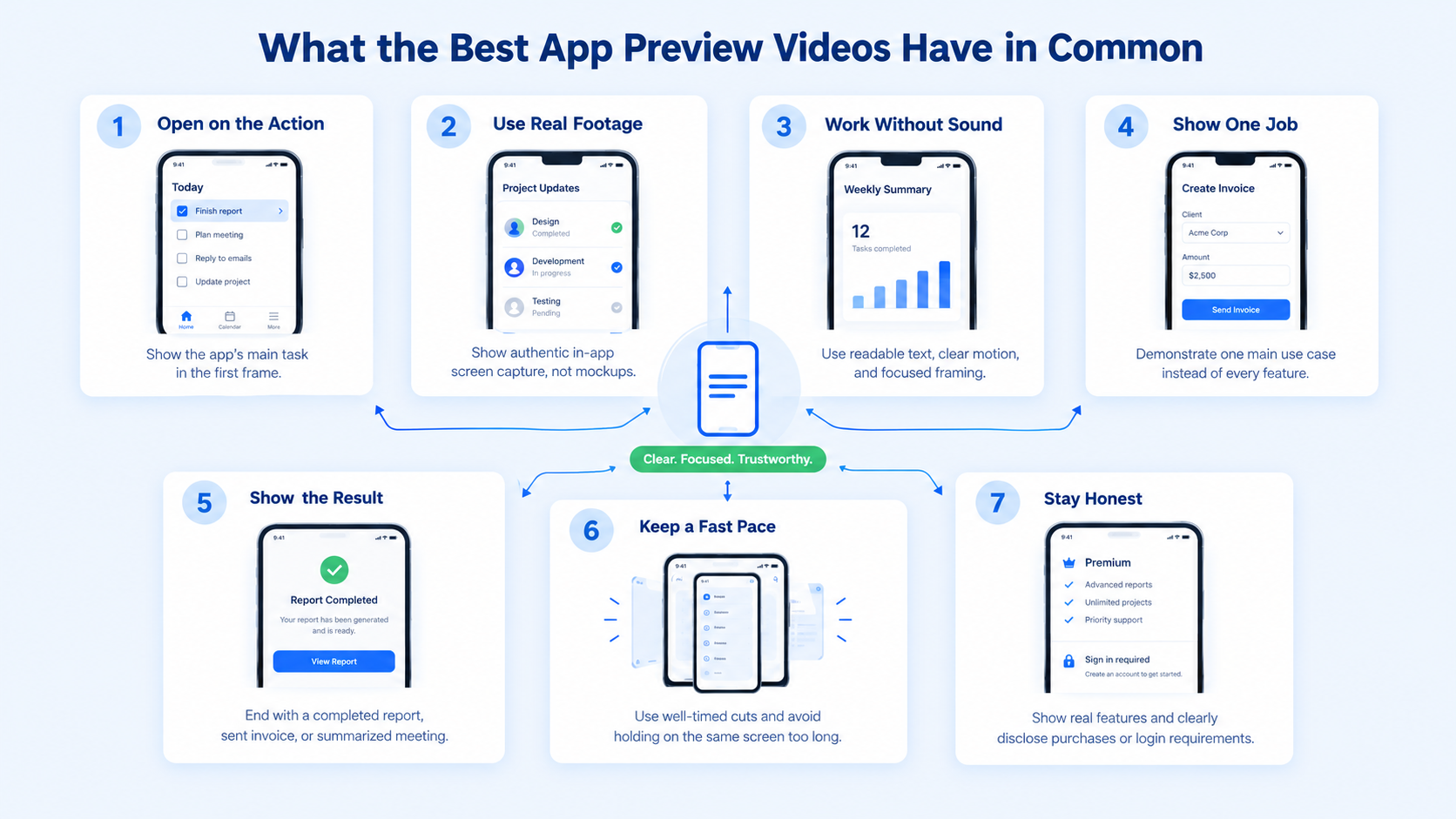
- They open on the core action. The first frame shows a user doing the thing the app is for.
- They use real footage. Both stores prioritize real in-app capture, and buyers trust it more than polished mockups.
- They work without sound. Text, motion, and framing explain each step.
- They show one job. A preview that tries to show every feature shows none of them.
- They show the result. The end of the video lands on the outcome, such as a finished report, a sent invoice, or a summarized meeting.
- They pace for thumbs. Cuts happen where attention drops, usually when the same screen stays up for too long.
- They stay honest. They do not imply features the app lacks, and they disclose purchases or logins.
A shot-by-shot structure for a 30-second preview
This structure is my own working template. It is not an Apple or Google rule.
If you can make three previews, use each for a different job:
- Preview one: the main workflow, from input to output.
- Preview two: the feature that separates you from alternatives.
- Preview three: proof, such as integrations, security, or a team workflow.
What B2B and AI apps should show
Generic advice fails B2B apps. Here is what I would show in each category.
For any app, use demo data. Do not show real customer names, balances, or messages.
Examples worth studying, with an important caveat
I can point you to examples of strong product demo storytelling, but they are not all App Store previews. A third-party list of animated product demo videos published in September 2026 highlights several software demos and the technique each uses. Its notes include:
Slack: a problem-first story that describes the chaos of keeping teams in sync, then shows the product addressing it
Video Embed: https://youtu.be/T9JSZxRlMVA?si=FSuJztBRh8xq_4jc
Microsoft Copilot: a screencast that walks through a real prompt, instead of only describing the tool
Video Embed: https://www.youtube.com/watch?v=HN1dPpIOtSo
Shopify Finance: live footage of a business owner describing frustrations, then a screencast zooming into the product
Video Embed: https://www.youtube.com/watch?v=4_Sd8bTjypU
Asana: a mix of live footage and screencast animation with a calm voiceover
Video Embed:
<iframe allowtransparency="true" title="Wistia video player" allowFullscreen frameborder="0" scrolling="no" class="wistia_embed" name="wistia_embed" src="https://fast.wistia.net/embed/iframe/8tvc0mh26w" width="400" height="225"></iframe>
These are animated product demo videos, not store previews, and the list does not give their lengths. The best app preview videos borrow their storytelling and then cut it down to the store limits. Use them for storytelling lessons: lead with a problem, show real usage, and end on an outcome. Then cut the idea down to fit the store limits.
Our own guides on product demo videos for SaaS and SaaS product video examples that convert go deeper on longer formats.
Captions, sound, and design
Because Apple previews autoplay muted, captions and text design are not optional. In my experience, text is where the best app preview videos separate themselves from average ones.
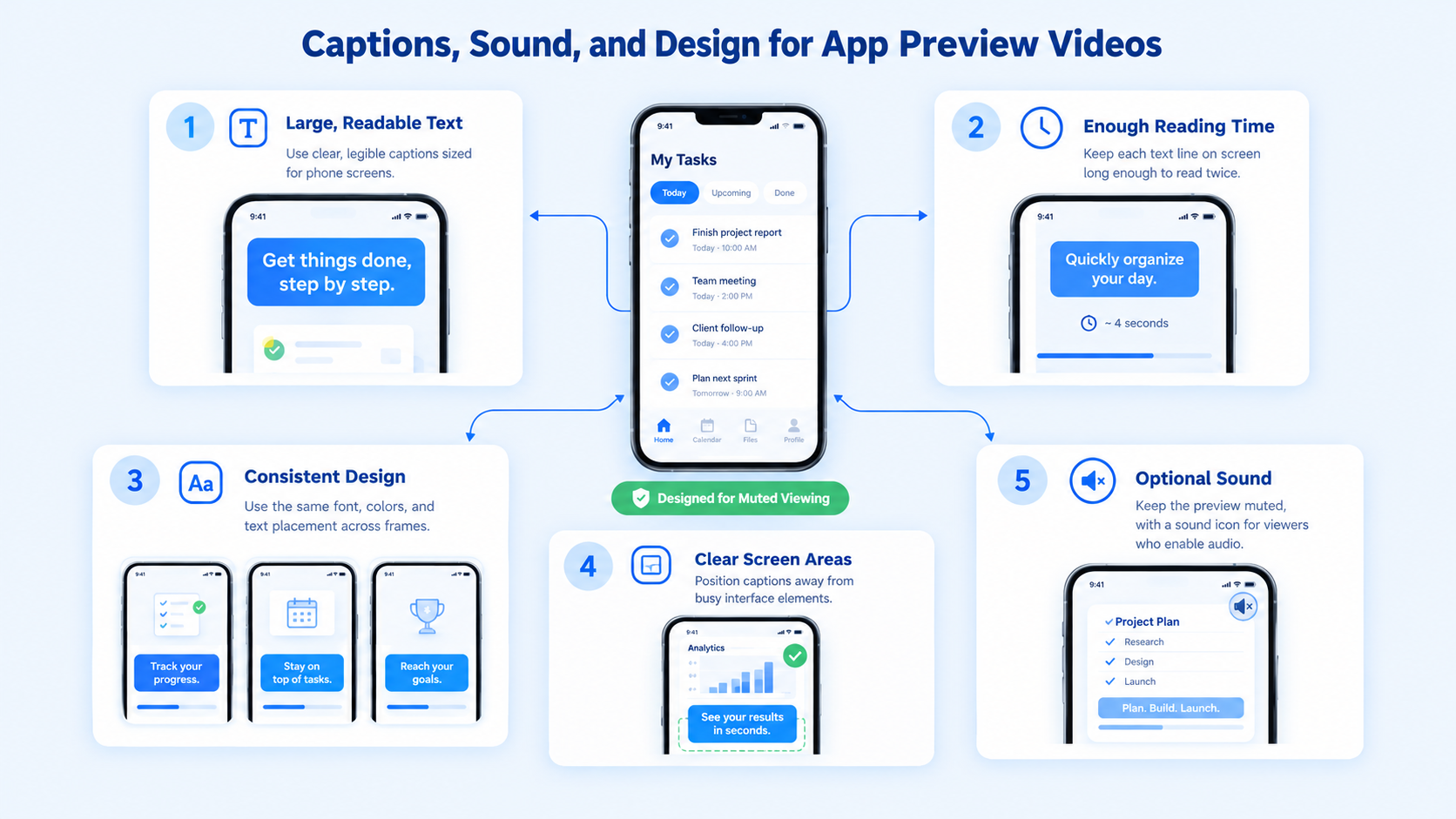
- Keep text large enough to read on a phone
- Keep each line on screen long enough to read twice
- Use consistent type, color, and placement
- Avoid text over busy parts of the interface
- Add a light music bed or UI sounds only for users who turn sound on
For more on this, see why B2B videos need captions and how to add captions and subtitles that lift retention. If your preview uses animated callouts or UI highlights, motion graphics can keep them consistent and clean.
How to test whether your preview works
Do not decide by taste. Apple lets you test your product page directly.
Apple's product page optimization lets you test icons, screenshots, and app previews. You can run up to three alternate treatments against your original page, a test runs for up to 90 days or until you stop it, and you can run only one test at a time. Apple's description indicates the test covers organic App Store traffic.
A sensible testing plan:
- Choose one change, such as a new preview opening.
- Keep screenshots and icon the same during the test.
- Run the test long enough to reach confidence.
- Compare conversion rate on the product page.
- Keep the winner, then test the next change.
Common mistakes
- Starting with a logo animation that delays the core action
- Using mockups or footage that is not captured in the app
- Showing every feature, so the story gets lost
- Writing text that is too small or leaves the screen too fast
- Including prices or dated promotions that Apple discourages
- Filming a device or hands when Apple asks for in-app capture only
- Leaving ads on in a Google Play preview
- Skipping localization, so global users see the wrong language
A production workflow that works
Teams often ask what it takes to produce strong previews on a normal release schedule. This is the sequence I would follow.
Many B2B teams keep this work in-house until the first version ships, then bring in help to maintain a clean visual system across releases. Komet Media supports that stage with short-form video editing and video editing services, and our B2B SaaS video editing work covers product-led video more broadly. The same footage can often be cut into LinkedIn and Reels clips that explain the product to buyers.
A pre-submission checklist
Run through this list before you upload to either store.
- The first three seconds show the core action, not a logo.
- Every shot is real in-app capture with demo data.
- All text is readable on a phone with the sound off.
- No prices, dates, or seasonal references appear.
- Any purchase, subscription, or login requirement is disclosed.
- The poster frame represents the app clearly.
- The Google Play version is a single public or unlisted YouTube video with ads disabled.
- Each language version uses localized text.
- Someone outside the team has watched it muted and can explain what the app does.
If item 9 fails, the video is not ready, however polished it looks.
Conclusion
The best app preview videos are not the most cinematic. They are the clearest: one workflow, real footage, readable text, and a visible result. If you build to the store rules, test against your current page, and keep the story honest, the preview becomes a working part of your product page.
FAQ
1. What makes the best app preview videos?
They open on the core action, use real in-app footage, work without sound, show one job, and end on a clear result. They also follow the store rules on length, content, and disclosures.
2. How long should an app preview video be?
On the App Store, previews can run up to 30 seconds. On Google Play, only the first 30 seconds autoplay, and the core experience should appear within the first 10 seconds.
3. How many previews can I upload?
Apple allows up to three app previews per supported language. Each should show something new, and together they should tell a cohesive story.
4. How much do app preview videos cost to produce?
Cost depends on scope, motion graphics, voiceover, localization, and how many revisions you need. I do not have a reliable public benchmark to quote. At Komet Media, our video retainers typically run from roughly $2,500 to $5,000, depending on volume, difficulty, and turnaround, and a single preview project (whether edited from existing footage or produced from scratch) would be scoped separately.
5. How long does it take to make a preview?
A single preview can take days to a couple of weeks, depending on how fast the team can capture clean footage and approve text. Localization and a test plan add time.
6. Do app preview videos improve conversion?
They can, but I have not found reliable public data that quantifies the lift, so I will not quote one. Use Apple's product page optimization to measure your own result.
7. Should we make the preview in-house or hire a video partner?
Product and marketing teams usually capture the footage best, because they know the workflow. A video partner helps most with scripting for muted viewing, editing, motion graphics, and reusing the footage across other channels.
8. Does Komet Media produce app preview videos?
We support B2B SaaS, AI-Native, and funded technology teams with product-led video editing (both from scratch and from existing recordings) and motion graphics, and the same footage can feed our short-form distribution work. If you want to talk about scope, you can book a call.


