
🪄 AI Summary
Heading 1
Heading 2
Heading 3
Heading 4
Heading 5
Heading 6
Lorem ipsum dolor sit amet, consectetur adipiscing elit, sed do eiusmod tempor incididunt ut labore et dolore magna aliqua. Ut enim ad minim veniam, quis nostrud exercitation ullamco laboris nisi ut aliquip ex ea commodo consequat. Duis aute irure dolor in reprehenderit in voluptate velit esse cillum dolore eu fugiat nulla pariatur.
Block quote
Ordered list
- Item 1
- Item 2
- Item 3
Unordered list
- Item A
- Item B
- Item C
Bold text
Emphasis
Superscript
Subscript
Most SaaS buyers have already decided whether to book a demo before they ever talk to sales. The deciding factor? What they watched on your website. Product demo videos for SaaS are no longer a nice-to-have in B2B software marketing, they're the first real proof that your product solves what it promises. This guide covers everything: what makes them work, how to build them, how long they should run, and what separates the videos that close from the ones that collect dust.
TL;DR
- SaaS websites with product videos convert at ~4.8%, versus ~1.9% without one, nearly a 2.5x lift.
- 2–3 minutes is the optimal length for most product demo videos, with homepage overviews best kept to 60–90 seconds.
- Lead with the buyer's problem in the first 5 seconds, not your logo, not your tagline.
- A single well-built demo, distributed across your funnel, outperforms a library of mediocre ones.
What Makes a Great SaaS Product Demo Video?
The difference between a demo that converts and one that gets skipped rarely comes down to production budget. It comes down to structure and intent. The best demo video is not the one with the highest production value. It is the one that shows the right person solving the right problem at the right moment in their buying journey. The anatomy of a high-performing product demo video for SaaS breaks down into five non-negotiable elements:
- Problem-first opening: You have about 5 seconds before a viewer decides to keep watching or leave. Spend those seconds on the problem, not your brand.
- Immediate product visibility: Show the UI within the first 15 seconds. Buyers want to see the software, not animated diagrams about the software.
- Outcome framing: Don't narrate features, narrate what life looks like after using those features. "You'll close the report in 4 clicks" beats "our reporting module includes 47 filters."
- Single, specific CTA: One clear call to action, "sign up for free" or "book a demo", not both. Don't confuse the user at the end.
- Embedded analytics: You need to know where users are dropping off. Only analytics can help you optimize the video. Platforms like Wistia and Vidyard both offer frame-by-frame drop-off data, which is exactly the kind of feedback loop that separates one-off video production from a genuine video system.
93% of B2B buyers say video builds brand trust, and 91% of consumers feel more confident to purchase a product after they've watched a video. That trust signal is especially critical in B2B software marketing, where buyers can't physically touch your product and are evaluating five alternatives simultaneously.
The teams at Komet Media build product demo videos structured around this framework, not as one-off productions, but as repeatable video systems that compound across your customer conversion funnel.
How Long Should a SaaS Demo Video Be?
Length is almost always the wrong question. Density is the right one. Length is not the problem. Density is. Every second either advances the story or wastes the viewer's time. That said, length targets do matter, because they force discipline. Here's how to think about it by context:
The average top-performing SaaS demo video runs 60 to 120 seconds. But context overrides averages. For product demos, where your goal is usually to get a prospect to take a next step, you want to front-load your most important content and keep total length in the 2-to-3-minute range.
The real trap most B2B SaaS teams fall into: one demo at one length, sent to all three buyer types. The economic buyer skips the feature walkthrough. The technical evaluator is frustrated by a 90-second overview that shows nothing implementable. Neither converts from a video that wasn't built for them.
The solution is a demo hierarchy, not more videos, but smarter versioning. Record one master session (8–12 minutes), then cut it into audience-specific assets. Your short-form video editing workflow handles this systematically rather than starting from scratch each time.
Watch retention cliff: 30% of viewers leave within 30 seconds and 55% leave within a minute. If your product payoff arrives at the two-minute mark, most of your audience never sees it.
Demo Video vs. Explainer Video: What's the Difference?
This distinction matters more than most SaaS teams realize, because the two formats serve different jobs in your pipeline.
A demo video gives viewers a real look at your product's interface and how it works, while an explainer video breaks down big-picture ideas or value props, often with the help of animations. Both formats have a role in a complete B2B software marketing strategy, but they answer different buyer questions. An explainer video answers "what is this?" A product demo video answers "does this actually work for my situation?"
The animated UI demonstration sits between the two, it shows the product but uses motion graphics to highlight specific interactions, smooth over rough UI states, and control exactly what the viewer focuses on. This format works especially well for animated UI demonstrations in complex SaaS products where live screen recordings feel cluttered.
For SaaS onboarding experience content and customer success enablement, the demo video wins. Platforms like Intercom and Pendo embed short product demo clips directly in onboarding flows to lift user activation rates without requiring a sales touchpoint. That's product-led growth working exactly as intended, video doing the selling that a rep would have done on a call.
How to Create a Product Demo Video for SaaS (Step-by-Step)
This is the process I'd hand to any SaaS team starting from zero.

- Define one buyer persona and one use case: Don't try to serve everyone in a single video. Pick your highest-converting ICP segment and build the first demo for them specifically.
- Script the problem before scripting the product: Write two sentences describing the pain your viewer feels right now. That's your opening. Everything else follows from it.
- Build a clean demo environment: Use a sandbox account with realistic data. Buyers don't want to see "Test User 001" in your CRM screenshots.
- Record with screen recording software: Tools like Loom work for fast, authentic recordings. For polished output, Camtasia or dedicated explainer video production workflows give you more editorial control in post.
- Edit for density, not duration: Every clip that doesn't advance the story gets cut. Dead air, loading screens, and navigation padding all come out.
- Add captions and visual callouts: Most buyers watch without sound in a browsing context. Motion graphics callouts direct attention to the specific UI element you're narrating.
- Choose a video hosting platform: Wistia and Vidyard are the standard choices for B2B software marketing, both offer viewer-level analytics, lead capture gates, and CTA overlays that a YouTube embed can't match.
- Embed, test, and iterate: Use Wistia or Vidyard heatmaps to find your drop-off point, then re-edit or restructure the section that's losing viewers.
The video editing services at Komet Media are built around this exact production loop, structured to move fast on initial production and faster on iteration.
SaaS Demo Video Best Practices That Actually Move Pipeline
Best practices in demo video are only useful if they connect directly to pipeline outcomes. Here are the ones that do:
Lead with pain, not product: The "aha moment", where a user realizes how your product solves their specific problem, should happen in the first 30 seconds. Anything that delays it costs you viewers and conversions.
Use the interactive product walkthrough format where possible: Interactive demos convert at 38%, a 52% lift versus standard screen share. For asynchronous demos embedded on your site or in sales outreach, interactive product walkthrough tools give buyers agency, and agency increases trust.
Match the demo to the channel:
- Homepage: Short, outcome-led, drives free trial conversion
- Email outreach: Personalized Loom-style, references their specific pain
- Sales enablement content: Feature-specific, used post-discovery call
- Intercom / in-app: Micro-demo format, 30–60 seconds, tied to a specific feature trigger
Gate selectively: A video gate on a mid-funnel asset (like a deep-dive walkthrough) can capture leads without friction, but gating a top-of-funnel homepage overview kills discovery. Platforms like HubSpot and Vidyard let you set conditional gates by time-watch, so you can ask for an email after 60 seconds of genuine engagement.
Treat the demo as sales enablement content, not marketing collateral: Most SaaS buyers expect to see the product before booking a sales call, which makes self-serve video demos critical for pipeline generation. Your demo is often the meeting your rep never got to take.
The webinar and podcast content your team is already producing is source material for demo-adjacent assets, repurposed clips showing real product thinking, founder-led walkthroughs, and customer-facing product education that supports pipeline without adding to your sales team's workload.
Common Mistakes That Kill SaaS Demo Video Performance
A third of viewers drop off after 30 seconds. Nearly half leave before the one-minute mark.
Most of those drop-offs are caused by the same avoidable mistakes.
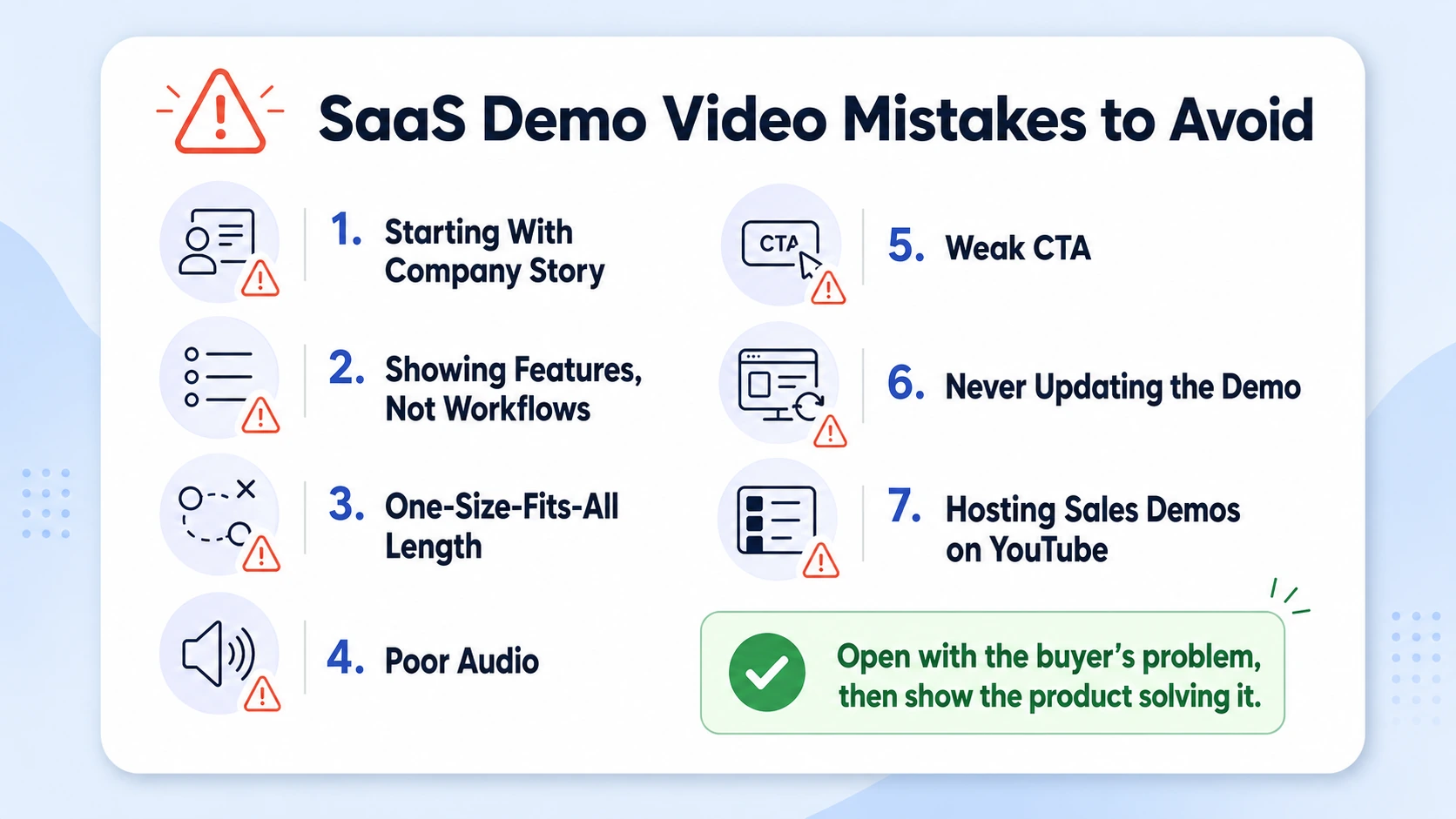
- Starting with your company story: Buyers don't care about your founding year or your Series A in the first 60 seconds. They care about whether the product fixes their problem. Open with the problem.
- Demoing features instead of workflows: Showing that a button exists is not the same as showing what happens when a real user clicks it in a real scenario. Demo the workflow, not the feature list.
- One-size-fits-all length: 88% of B2B buyers won't talk to sales without seeing a demo first. If your only demo is a 12-minute full-platform walkthrough, you're losing the majority who wanted a 90-second overview.
- Ignoring audio quality: Poor audio is the fastest way to kill credibility in B2B software marketing. A buyer who can barely hear your narration questions the professionalism of your entire product.
- No CTA or a weak CTA: "Thanks for watching" is not a CTA. "Start your free trial, link in the description" is. Every demo needs a single, direct next step.
- Never updating the video: Founders fear that the moment they publish a video, their UI will change, making the video look dated and decreasing trust. The answer isn't to avoid publishing, it's to build a production workflow that makes updates fast and affordable.
- Hosting on YouTube by default: YouTube is a discovery platform, not a sales platform. It has no lead capture, no viewer analytics, and it auto-plays competitor content in the sidebar when your buyer finishes watching. Use Wistia or Vidyard for anything sales-critical.
Conclusion
Product demo videos for SaaS do one job: get the right buyer to take the next step. When they're built correctly, they work across every stage, homepage conversion, sales enablement, SaaS onboarding experience, and churn reduction.
Key takeaways:
- Lead with the buyer's pain in the first 5–10 seconds, not your brand.
- Match video length to context: 60–90 seconds for top-of-funnel, 2–3 minutes for mid-funnel product demos.
- Use Wistia or Vidyard for hosting, not YouTube, to capture analytics and leads.
- Build a video system, not a one-off production. Iteration compounds.
Ready to build a demo video system that supports your pipeline? Talk to Komet Media.
Frequently Asked Questions
Q1: How many product demo videos does a SaaS company actually need?
Start with one: your homepage overview targeting your primary ICP. Once you can measure its impact on free trial conversion and demo requests, build out a feature-specific and a sales enablement version. Most mature SaaS teams maintain 3–6 active demo assets covering different buyer stages and use cases.
Q2: Should I use Loom or professional video production for my SaaS demo?
Loom works well for personalized sales outreach and internal enablement. For your homepage and any asset that buyers encounter before they know you, a produced demo with clean screen recording, captions, and motion graphics callouts performs consistently better, because production quality signals product quality in the buyer's mind.
Q3: What's the best video hosting platform for SaaS product demos?
Wistia and Vidyard are the two standard choices for B2B software marketing. Both offer viewer-level heatmaps, CTA overlays, and lead capture gates. Wistia is generally better for brand-focused embedding; Vidyard integrates more deeply with HubSpot and Salesforce for sales teams that need per-viewer intent data.
Q4: How do I measure whether my product demo video is actually working?
Track four metrics: play rate (how many page visitors click play), average watch time, drop-off point, and downstream conversion rate (demo requests or free trial signups from viewers vs. non-viewers). Wistia and Vidyard both surface these natively.
Q5: Should a SaaS demo video be gated or ungated?
Homepage demos should be ungated, friction kills discovery. Mid-funnel deep dives and feature walkthroughs can be gated after 60+ seconds of watch time, capturing only genuinely engaged prospects. Gating an overview video before a buyer knows your product will cost you more leads than it generates.
Q6: How often should I update my SaaS product demo video?
Revisit your demo whenever you ship a significant UI change, reposition your core value prop, or notice a sustained drop in play rate or conversion. For fast-moving SaaS teams, quarterly reviews are a reasonable cadence, with minor narration or caption updates possible without a full re-shoot.


