
🪄 AI Summary
Heading 1
Heading 2
Heading 3
Heading 4
Heading 5
Heading 6
Lorem ipsum dolor sit amet, consectetur adipiscing elit, sed do eiusmod tempor incididunt ut labore et dolore magna aliqua. Ut enim ad minim veniam, quis nostrud exercitation ullamco laboris nisi ut aliquip ex ea commodo consequat. Duis aute irure dolor in reprehenderit in voluptate velit esse cillum dolore eu fugiat nulla pariatur.
Block quote
Ordered list
- Item 1
- Item 2
- Item 3
Unordered list
- Item A
- Item B
- Item C
Bold text
Emphasis
Superscript
Subscript
Most founders run a webinar, send a replay link, and move on. That is leaving the majority of the value untouched. Recorded replays generate 2.4x the unique viewers of a live session within 30 days, and 58% of webinar-sourced pipeline opportunities first touch the replay, not the live event. Amplifying webinar content after the event is not a nice-to-have content tactic. It is the core of a modern B2B video growth system. This guide gives you a complete, step-by-step playbook to turn every webinar into months of trust-building content.
TL;DR
- Your webinar recording is a content library, not a one-time asset.
- Clip extraction, LinkedIn video distribution, and email nurture sequences are the highest-ROI post-event moves.
- B2B marketers can derive on average 6.3 new pieces of content from each webinar.
- The frameworks here apply whether you hosted 40 people or 4,000.
Why Amplifying Webinar Content After the Event Is a Revenue Decision
Most teams measure webinar success by live headcount. That framing is broken. The single biggest shift in webinar economics between 2020 and 2026 is the inversion of live versus replay viewership. Replay now generates 2.4x the unique viewers of the live broadcast on a 30-day window, and 58% of pipeline-sourced opportunities first touch the replay. If you are not actively distributing and repurposing what you recorded, you are surrendering pipeline to competitors who are. The deeper business case for founders and executives is authority.
Webinars outperform all other formats for lead quality in B2B, with 69% of B2B marketers identifying webinars as their top-performing video type. But that lead quality only compounds when the content reaches buyers who missed the live session. That is what amplifying webinar content after the event actually means in practice: turning a 60-minute conversation into a persistent, searchable, trust-building asset across every channel where your buyers spend time.
There is also a straight-line connection between video visibility and hiring and investor interest. When a founder or executive shows up consistently with strong, specific video content, it signals operational discipline and domain authority to every stakeholder audience simultaneously. Wistia reports that one third of webinars still receive plays three months after the live event, and nearly 90% of teams repurpose webinar content in some form. The teams generating the most mileage are not working harder. They have a system. Building that system is what the rest of this guide is about. The webinar is the input. The content library is the output. Everything in between is just execution.
At Komet Media, this is the entire premise of how we build video growth programs for B2B founders. The webinar is not the product. The ecosystem of clips, articles, sequences, and social assets it spawns is the product.
How to Repurpose Webinar Content After the Event: The Core Framework
Content atomisation starts with a single source of truth: your cleaned, edited webinar recording. From one hour of session, you can extract assets across four distinct tiers.
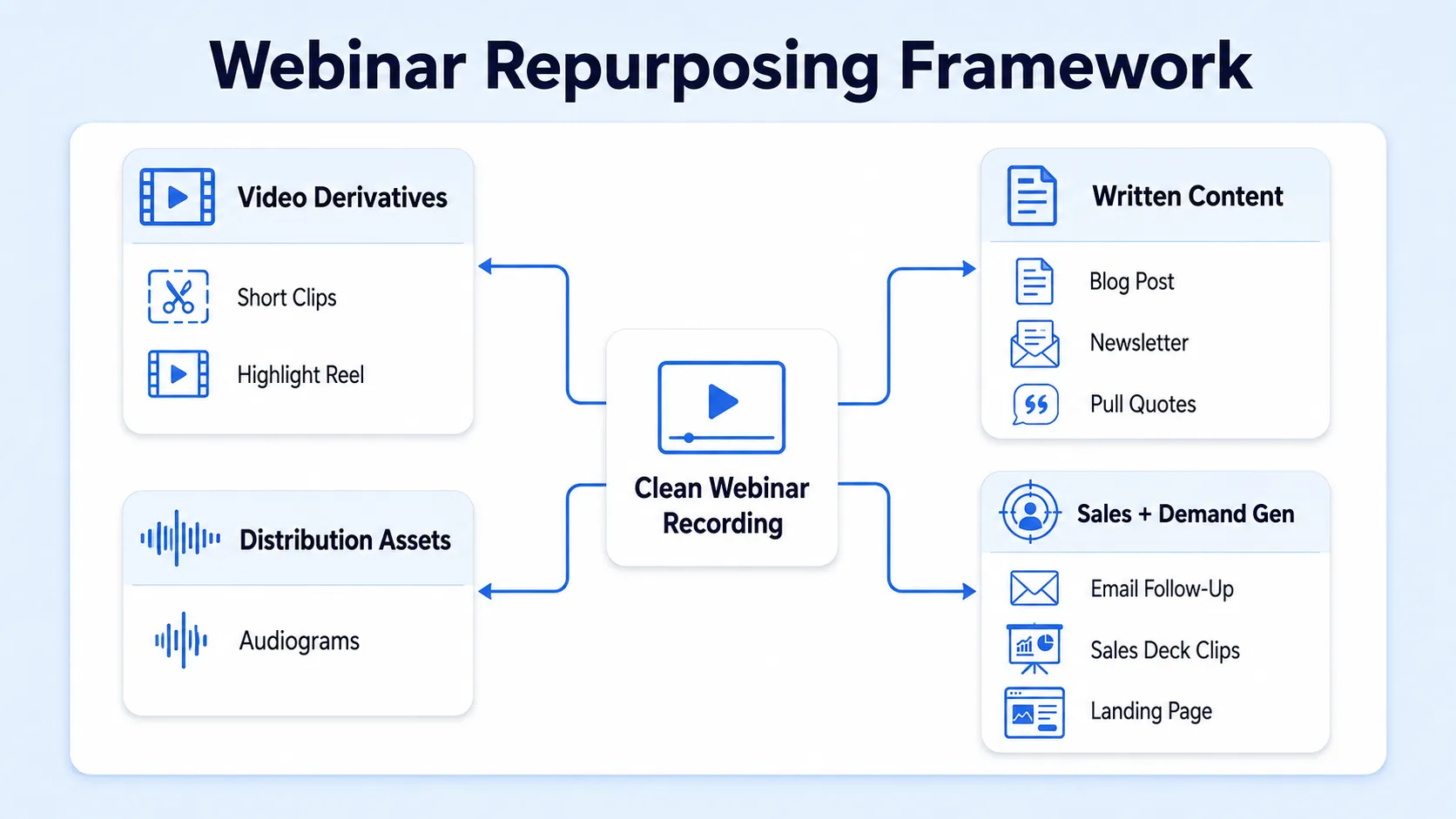
Tier 1: Direct video derivatives
- 3 to 7 short-form clips (60 to 90 seconds each) for LinkedIn and YouTube Shorts
- A highlight reel (4 to 6 minutes) for your website or Wistia hub
- A condensed "best moments" cut (10 to 15 minutes) for YouTube SEO
Tier 2: Written content
- A long-form blog post or thought leadership article built from the session transcript
- A LinkedIn newsletter edition or article with key takeaways
- A PDF summary or guide offered as a lead magnet
Tier 3: Distribution assets
- 5 to 10 pull quotes formatted as static social graphics
- 3 audiogram clips for podcasting distribution via Komet Media's podcast editing services
- Email follow-up sequences for both attendees and no-shows
Tier 4: Sales and demand gen
- Curated clips embedded in sales decks and outbound sequences
- A clip-based landing page for future lead capture
- Testimonial or social proof moments extracted from attendee Q&A
65% of marketers already repurpose webinar content , but most stop at one or two derivative assets. A complete content repurposing strategy touches all four tiers within the first two weeks after the event.
How to Turn a 60-Minute Webinar into Social Media Content
This is the question I get from almost every founder we work with. The answer is a structured clip extraction process, not a random grab of "good moments."
- Export and transcribe: Pull your recording at the highest available resolution (1080p MP4). Run it through Descript or Riverside to generate a full, timestamped transcript.
- Tag high-value moments: Scan the transcript for counterintuitive statements, specific data points, framework explanations, and strong opinion takes. These become your clip candidates.
- Select 5 to 7 clips: Target 60 to 90 seconds each. Each clip must be self-contained, meaning a viewer with no webinar context can understand and find value in it alone.
- Edit for mobile-first viewing: Crop to 9:16 vertical or 1:1 square. Add burnt-in captions. Open with a hook in the first three seconds.
- Stage your release: Do not publish all clips the same week. Spread them across four to six weeks to create consistent audience touchpoints.
- Repurpose clip captions into LinkedIn posts: Each clip ships with a native LinkedIn text post that expands on the idea in the clip. This doubles your content surface area from the same source.
Emails containing video previews see up to 300% higher click-through rates compared to static emails, and adding a video thumbnail or animated preview to B2B email campaigns can triple click-through rates. That stat matters for step 5: your email nurture sequence should feature the clips, not just a replay link.
Best Tools for Repurposing Webinar Recordings into Short Clips
The right tool stack depends on your workflow. Here is how the core options compare:
Riverside offers an elegant, end-to-end solution by combining high-fidelity webinar hosting with powerful AI-driven repurposing features. Instead of recording on one platform and exporting to another, Riverside allows you to host, record, and repurpose within a single streamlined workflow.
Descript revolutionises video editing by transforming webinar recordings into an editable text document. For founders who want precise control over the final cut, Descript remains the most efficient post-production tool. For many creators, the ideal workflow combines both: record in Riverside for quality, then edit in Descript for efficiency.
This is the stack most of our clients at Komet Media's video editing services are running in 2026.
LinkedIn Video Distribution Strategy for Founders and Executives
LinkedIn is the non-negotiable channel for B2B founder visibility. LinkedIn video experienced a 36% year-over-year increase in both watch time and video uploads in 2025. Personal profiles generate 8x more engagement than company pages, and posts from individual profiles receive 8x the engagement of identical content from company pages.
This is the most important structural insight in founder-led marketing: your personal LinkedIn profile, not your company page, is where webinar clips must live first.
The LinkedIn distribution sequence for each clip:
- Post the native video clip to your personal LinkedIn profile (not just a shared link).
- Write a 150 to 250 word caption that expands on the clip's core idea.
- Tag any co-presenters or guests from the webinar.
- Comment on your own post within the first 30 minutes with a follow-up thought or a question for your audience.
- Reshare to your company page 24 to 48 hours later.
- Submit to relevant LinkedIn newsletters or group feeds where appropriate.
LinkedIn native video content achieves an average engagement rate of 5.1 to 6%, compared to 2 to 3% for static image posts. Webinar clips, when cut to highlight genuine insight rather than promotional messaging, consistently outperform this baseline because they carry credibility signals: a real expert, a real audience, a real conversation.
Do not publish clips from your webinar as a brand. Publish them as a person. Founders who distribute content through their personal profiles build buyer trust, investor attention, and hiring appeal simultaneously. Our short-form video editing services are built specifically around this distribution model.
Webinar Content Repurposing Strategy for CEOs: Building the Evergreen Content Framework
The goal of amplifying webinar content after the event is not just traffic. It is an evergreen content framework that continues producing trust and visibility for twelve months or more after the live session. Here is how to structure it:
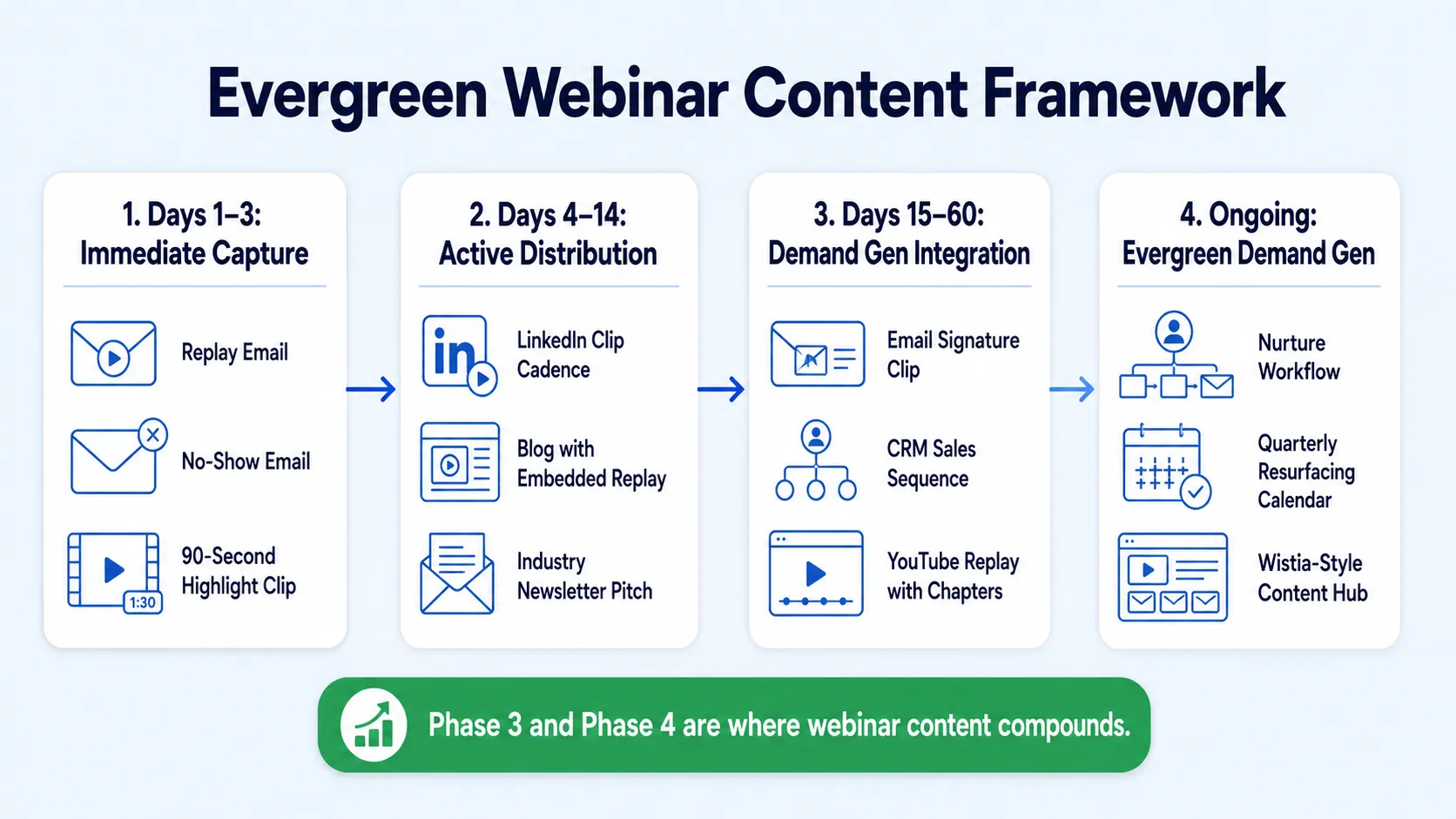
Phase 1 (Days 1 to 3): Immediate capture
- Send the replay link to all registrants with a personalised subject line.
- Nearly half of all replay views occur via links sent within 24 hours after the live event. Speed here is measurable.
- Deliver a no-show email with a specific, value-forward subject line and a 90-second highlight clip embedded.
Phase 2 (Days 4 to 14): Active distribution
- Begin publishing LinkedIn clips on a two-per-week cadence.
- Publish the long-form blog post with embedded full replay.
- Pitch the webinar recording to a relevant industry newsletter as a resource.
Phase 3 (Days 15 to 60): Demand gen integration
- Add the best clip to your email signature.
- Embed relevant clips inside active sales sequences using HubSpot or your preferred CRM.
- Upload the edited full replay to YouTube with keyword-optimised title, description, and chapters for YouTube SEO.
Phase 4 (Ongoing): Evergreen demand generation
- Route new leads into a nurture sequence that includes the webinar replay as a touchpoint.
- Resurface clips quarterly when the topic becomes relevant again (budget season, product launches, market events).
- Build a content hub on Wistia that aggregates all past webinar recordings for gated access.
Over half of B2B companies now include webinars in their content marketing stack, and most repurpose them into blog posts, social clips, or eBooks. The difference between brands that see compounding returns and those that do not is whether they have a repeatable Phase 3 and Phase 4 workflow.
Webinar Content Amplification Mistakes Founders Make
These are the patterns I see consistently, and each one is a direct cost to pipeline and visibility.
Treating the replay as the repurposing strategy. Sending a replay link is distribution, not repurposing. The replay requires your buyer to find 60 minutes. A sharp 90-second clip requires 90 seconds. Clips reduce the friction to trust-building.
Clipping for length instead of value. The wrong approach is to slice the webinar into equal segments. The right approach is to extract moments of genuine insight, strong opinion, or counterintuitive data. Video success on LinkedIn depends heavily on the first three seconds; hook viewers immediately with a bold question, surprising statistic, or direct statement.
Distributing only through company channels. Posts from individual profiles receive 8x the engagement of identical content from company pages. Founder-led content distribution is structurally superior to brand-channel distribution for B2B audiences.
Ignoring no-show leads. The audience that registered but did not attend is a warm lead segment that almost no one follows up with deliberately. A targeted no-show sequence with a clip and a specific call to action consistently outperforms generic replay emails.
Publishing all clips in one week. Flooding your feed with five clips from the same event signals volume, not authority. Spread clips across four to six weeks. Pair each with a standalone LinkedIn post. The same webinar should feel like a steady drumbeat of insight to your audience, not a one-day event.
Skipping YouTube SEO. The edited full webinar replay on YouTube, with a properly structured title, description, and chapter timestamps, becomes a searchable asset that compounds in visibility for years. Most founders skip this entirely and leave long-term organic demand generation on the table.
Webinar to Video Content Strategy: Measuring What Actually Matters
Benchmark reporting shows that post-event performance is increasingly measured using replay views, engagement actions, and content hub activity, not live attendance alone. If your current measurement framework stops at live attendee count, you are flying blind on the actual impact of your content. The metrics that matter for a founder-led content program:
63% of AI-adopting B2B marketers cite webinar repurposing as their primary AI use case. In 2026, AI-assisted transcription and clip identification have removed most of the manual work from this workflow. The remaining bottleneck for most founder teams is not tooling. It is the editing quality, the distribution discipline, and the follow-through on phases 3 and 4.
This is exactly the gap our team at Komet Media's webinar services closes for founders who already have the conversations but lack the system to turn them into consistent content output. The metric that should live on your dashboard: total pipeline opportunities that first touched a replay or derivative clip. That number tells you what your webinar was actually worth.
Conclusion
Amplifying webinar content after the event is the highest-ROI move available to most B2B founders and executives in 2026. The framework is clear:
- Extract clips systematically using tools like Descript and Riverside.fm, prioritising moments of genuine insight over length.
- Distribute through your personal LinkedIn profile first, on a sustained cadence across four to six weeks.
- Build an evergreen content framework that routes new leads into webinar content as a nurture touchpoint.
- Measure replay views, clip engagement, and pipeline attribution, not just live headcount.
- Avoid the common mistakes: single-channel distribution, ignoring no-shows, and treating the replay link as the end of the workflow.
The webinar recording sitting in your Zoom account right now is a trust-building asset. Go build something with it. If you need a team to run the system, start here.
Frequently Asked Questions
Q1: How soon after my webinar should I start publishing clips?
Start within 48 to 72 hours. Nearly half of all replay views occur via links sent within 24 hours of the live event. Clip distribution should follow immediately after, while audience attention is at its peak. Have your clip workflow ready before the event ends.
Q2: How many clips can I realistically get from a 60-minute webinar?
B2B marketers can derive on average 6.3 new pieces of content from each webinar. For video specifically, a well-structured 60-minute session typically yields 5 to 8 standalone clips at 60 to 90 seconds each, plus a 10-minute highlight cut for YouTube.
Q3: Should I gate the webinar replay or keep it open?
Gate it for lead capture if the topic is genuinely high-value and the audience is cold. Keep it open for warm audiences and existing pipeline contacts. A Wistia-hosted replay with optional email capture gives you flexibility: soft-gating captures leads without blocking warm viewers.
Q4: What is the single most important clip format for LinkedIn in 2026?
Vertical or square native video with burnt-in captions, under 90 seconds, opening with a strong opinion or counterintuitive data point. LinkedIn native video content achieves an average engagement rate of 5.1 to 6%, compared to 2 to 3% for static image posts. Hook quality in the first three seconds determines whether it gets watched.
Q5: How do I repurpose a webinar if I was not the sole speaker?
Extract clips featuring co-presenters or guests and tag them in your LinkedIn posts. Their networks become your distribution. This often doubles organic reach at zero added cost, and it builds social proof signals for buyers, investors, and future hires simultaneously.
Q6: How is Komet Media different from a standard video editing subscription?
We build B2B video growth systems, not just edited clips. Our focus is on turning your existing conversations and webinars into a sustained content engine that builds trust with buyers and visibility for executives. That means strategy, editing, and distribution architecture, not just a turnaround file.


